As data centers rapidly transition to ultra-fast 800G networks, managing hardware temperature has become an unprecedented challenge. The powerhouse behind this speed, the OSFP module, processes massive amounts of data but generates massive amounts of heat in the process. When multiple modules are packed tightly into a network switch, this extreme thermal load can quickly skyrocket.
If this heat isn't managed properly, it can lead to frequent data errors, system slowdowns, and even permanent hardware damage. This blog post explores the critical thermal management standards for the OSFP module, breaking down how its unique design tackles the 800G cooling crisis to keep your data flowing safely.
🍀 What is an OSFP Module and How Does It Look
The OSFP (Octal Small Form-factor Pluggable) module represents the next generation of optical transceivers, specifically engineered to handle the massive data loads of modern high-speed networks. Its physical appearance is defined by a robust, slightly wider casing that immediately sets it apart from older hardware generations. Understanding its structure reveals why it has become the go-to choice for supporting heavy 800G data traffic.

The Basic Size and Design of OSFP
The OSFP module features a distinctively wider and deeper profile compared to traditional transceivers, designed to accommodate advanced electrical components. It measures roughly 22.58mm wide, 13.0mm high, and 100.4mm long, making it slightly larger than legacy form factors. This intentional increase in size provides more internal surface area, which is vital for housing the high-performance optics required for 800G speeds.
Despite being larger, the clever mechanical design allows engineers to fit up to 32 OSFP ports into a standard 1U switch panel. This allows data centers to maximize their faceplate density while ensuring the physical hardware remains durable and easy to plug in. The balance of size and capacity ensures that high-speed networks can scale up without requiring massive layout changes.
Why OSFP is Different from Older Form Factors Like QSFP
The main difference between OSFP and older standards like QSFP (Quad Small Form-factor Pluggable) lies in their power handling and thermal limits. Traditional QSFP modules were built for lower bandwidths, meaning they have a flat top and rely entirely on the switch’s external cooling systems. In contrast, the OSFP module is built from the ground up to handle significantly more electrical power without overheating.
Additionally, older QSFP designs struggle to safely dissipate heat once data speeds cross the 400G threshold. OSFP solves this by integrating cooling features directly into the module housing itself rather than relying solely on the switch chassis. This structural evolution allows OSFP to easily support 800G and future 1.6T networks where older form factors would simply fail.
How the Physical Shape Helps Air Move Better
The external architecture of the OSFP module is specifically optimized to improve aerodynamics inside the network switch cage. By integrating cooling fins directly onto the top of its metal shell, the module acts as its own radiator to shed heat quickly. This unique shape allows high-velocity airflow from the switch fans to pass smoothly over the hottest components.
The following breakdown illustrates how specific physical design choices directly enhance airflow performance across the module:
| Physical Feature | Design Characteristics | Airflow & Cooling Benefit |
| Integrated Heat Sink Fins | Raised rows of metal ridges along the top surface. | Increases overall surface area, allowing passing air to sweep away trapped heat. |
| Wider Module Profile | Increased width compared to older legacy form factors. | Allows more open space inside the cage for optimal ventilation and air distribution. |
| Open-Front Ventilation | Strategic venting holes located near the optical connector. | Guides cool outside air directly into the warmest internal optical components. |
Main Reasons Why 800G Networks Need OSFP
Migrating to 800G networks requires a massive leap in bandwidth that older hardware structures simply cannot sustain. The OSFP module is necessary because it delivers eight electrical lanes running at 100G each, providing the raw pipeline needed for high-speed data processing. Without this specific architecture, data centers would experience severe bottlenecks trying to move massive cloud data traffic.
Furthermore, running at 800G speeds generates thermal energy that would melt or degrade standard transceivers within minutes. The OSFP standard provides the necessary structural space and power tolerance to handle up to 30W or more per port safely. Ultimately, it is the only form factor that guarantees structural survival and reliable performance under heavy 800G workloads.
🍀 Why Heating is a Big Problem for the 800G OSFP Module
Operating at 800G speeds pushes optical components to their absolute physical limits, generating unprecedented amounts of thermal energy. When an OSFP module gets too hot, it threatens the stability of the entire data center infrastructure. Uncontrolled heat acts as an invisible bottleneck, turning high-performance hardware into a major operational liability.

High Power Levels: From 15 Watts to Over 30 Watts
To process data at 800G speeds, the OSFP module requires a massive amount of electrical power, which instantly converts into heat. Older generation QSFP-DD transceivers typically operated on less than 15W, but modern 800G hardware routinely demands anywhere from 15W to over 30W per module. This doubling of power consumption creates a concentrated thermal hotspot within a very small physical footprint.
What Happens When Too Many Modules Are Packed Together
Modern network switches stack up to 32 OSFP modules side-by-side along a single 1U front panel. This ultra-dense arrangement means that the heat from one module immediately radiates into its neighbors, leaving no room for natural cooling.
When these high-power modules are packed tightly together, several critical issues occur:
- Thermal compounding: Individual hot zones merge into a single massive heat wall.
- Airflow blockage: Tight spacing restricts the natural paths where cool air can flow.
- Pre-heated air intake: Downstream modules are forced to breathe in hot exhaust air.
- Switch overload: The host switch chassis absorbs excess heat, stressing internal circuits.
How Extreme Heat Damages Network Equipment
Prolonged exposure to extreme heat causes rapid physical degradation of the delicate internal components inside the OSFP module. The internal lasers, which convert electrical signals into light, are highly sensitive to temperature and will degrade prematurely under high thermal stress. Over time, this constant heat baking cooks the surrounding circuitry, leading to sudden hardware failures and expensive replacement cycles.
Why Overheating Slows Down Data and Causes Network Errors
When an OSFP module overheats, the internal laser becomes unstable, which directly corrupts the optical light signals carrying your data. This signal degradation causes a massive spike in bit error rates, forcing the network to constantly retransmit lost data packets. To prevent total melting, the system will automatically throttle data speeds, resulting in severe network slowdowns and unexpected downtime.
🍀 Built-In Cooling Features of the OSFP Module
To combat the massive thermal energy generated by 800G data transmission, the OSFP module incorporates innovative structural engineering directly into its housing. Unlike legacy transceivers that rely purely on external hardware to stay cool, this advanced form factor takes matters into its own hands. Its clever physical layout forms the first line of defense against devastating heat buildup.
The Built-In Heat Sink: How the Integrated Fins Work
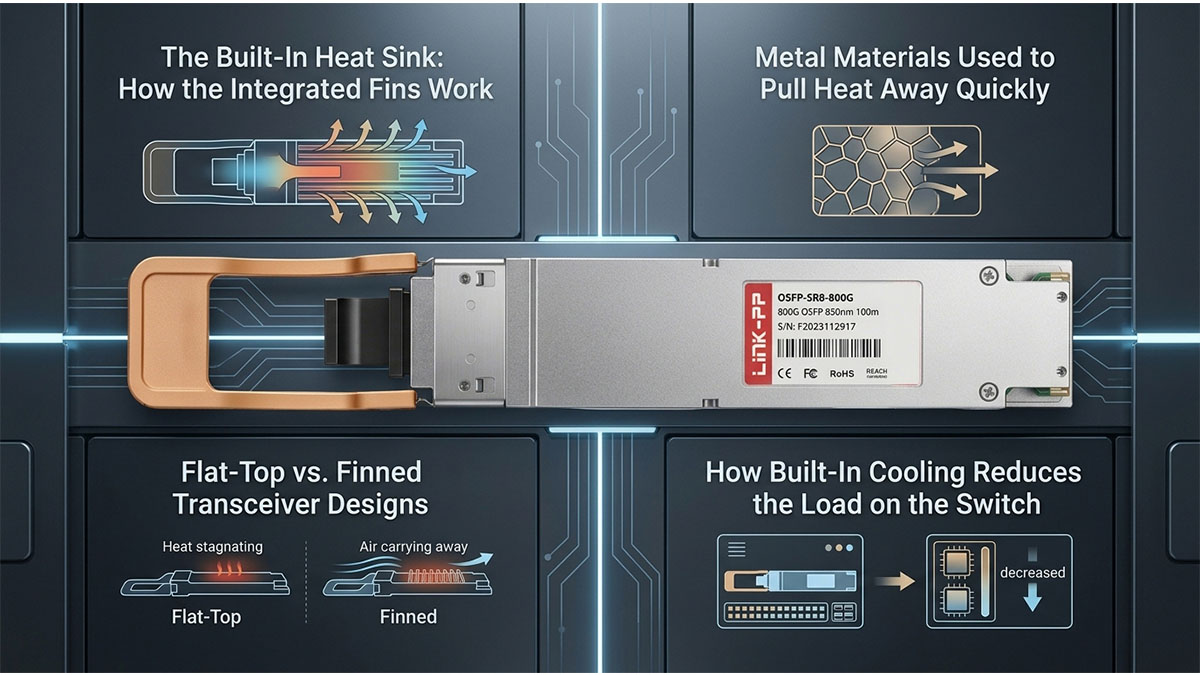
The standout feature of the OSFP module is its built-in heat sink, which consists of a series of ridges molded onto the top surface of the shell. These integrated fins vastly increase the surface area of the module that comes into contact with moving air. As cool air passes through the switch port, it sweeps directly between these narrow channels to lift heat away.
By embedding the radiator directly onto the transceiver itself, thermal energy does not get trapped inside the dense metal casing. This configuration ensures that heat transitions smoothly from the internal optical chips directly to the outside environment. It provides a highly efficient path for heat dissipation that operates entirely without moving parts.
Metal Materials Used to Pull Heat Away Quickly
The material composition of the OSFP module shell plays a critical role in its ability to manage high temperatures. Manufacturers typically utilize premium zinc, copper, or aluminum alloys to construct the outer casing due to their excellent thermal conductivity. These specific metals act like a thermal sponge, drawing heat away from delicate internal lasers almost instantly.
Once the heat is pulled to the outer shell, the specialized metal alloy ensures it distributes evenly across the entire surface rather than pooling in a single dangerous hotspot. This rapid heat transfer protects the sensitive internal circuitry from burning out during heavy workloads. Using high-grade metals guarantees that the transceiver remains physically stable under constant thermal stress.
Flat-Top vs. Finned Transceiver Designs
While standard OSFP modules feature integrated cooling ridges, certain specialized network setups require alternative form factors to match specific switch configurations. Choosing between a traditional finned model and a flat-top variant depends entirely on the design of the host switch chassis.
The comparison below outlines the structural differences and unique application choices for both design types:
| Transceiver Design | Structural Characteristics | Ideal Application Scenario |
| Finned Design | Features raised metal cooling fins directly on the module body. | Used in standard switches where forced air blows straight across the faceplate. |
| Flat-Top Design | Possesses a completely smooth top surface with no integrated ridges. | Designed for customized switches equipped with their own internal riding heat sinks. |
How Built-In Cooling Reduces the Load on the Switch
When optical modules manage their own thermal distribution effectively, it drastically reduces the cooling demands placed on the main switch. In older systems, the switch chassis had to work overtime, spinning its internal fans at maximum speed to pull heat out of buried ports. OSFP's self-cooling layout shifts this burden away from the main system, creating a much more balanced ecosystem.
Because the switch does not have to fight trapped pocket heat, the entire data center hardware unit runs much more efficiently. This internal relief translates to lower power consumption for system fans and less wear-and-tear on the switch power supply. Ultimately, self-cooling transceivers pave the way for more reliable, long-term network operations.
🍀 Airflow Strategies for Protecting Your OSFP Module
While integrated hardware features provide a solid foundation for heat dissipation, a well-engineered data center airflow strategy is vital for long-term reliability. Proper external ventilation ensures that the heavy thermal load generated by an OSFP module is continuously swept away from the equipment racks. Implementing the right air management techniques prevents dangerous heat pockets from forming around your high-speed connections.
Front-to-Back vs. Back-to-Front Cooling Directions
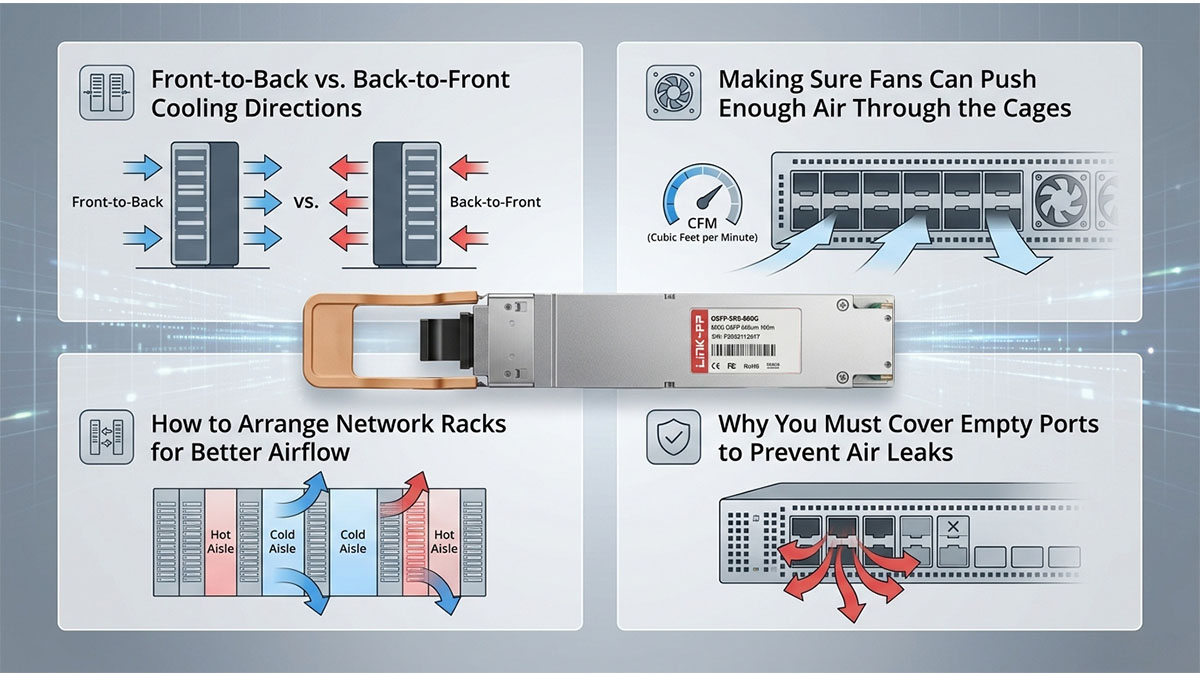
Data center operators must carefully match the cooling direction of their network switches to the overarching airflow design of the facility. Choosing between front-to-back and back-to-front movement dictates exactly how fresh air interacts with the warm optical transceivers. Selecting the wrong path can accidentally flood sensitive equipment with hot exhaust air.
Aligning your equipment orientation correctly provides several critical performance advantages:
- Front-to-back path: Ingests cold aisle air to cool the optical modules first.
- Back-to-front path: Routes air through the chassis before hitting the optics.
- Thermal predictability: Minimizes turbulent mixing of cold and hot air streams.
- Efficiency gains: Maximizes the cooling power of existing data center AC units.
Making Sure Fans Can Push Enough Air Through the Cages
The dense structure of 800G switches requires heavy-duty internal fans capable of maintaining high static pressure. Without sufficient force, moving air cannot penetrate the tight spaces between tightly packed OSFP module housings. Maintaining optimal fan speed and pressure is the only way to guarantee that heat is lifted away from the internal chips.
Failing to supply strong, consistent pressure leads to a variety of system hazards:
- Stagnant air pockets: Heat traps tightly inside the individual port cages.
- Fan motor fatigue: Weak fans burn out faster trying to push through resistance.
- Thermal throttling: Modules drop performance speeds to survive the stagnant heat.
- Uneven cooling: Inner ports remain dangerously hot while outer ports stay cool.
How to Arrange Network Racks for Better Airflow
The physical layout of network racks dictates how efficiently cool air moves into the hardware and how fast exhaust escapes. Implementing a strict hot/cold aisle containment configuration prevents the common problem of thermal recycling between server rows. Smart spacing and clean cable management ensure that nothing blocks the critical intake pathways.
Organizing your data center floor using these structural strategies yields immediate results:
- Aisle containment: Physically separates cold intake air from hot exhaust streams.
- Vertical cable managers: Keeps bulky patch cords away from exhaust vents.
- Blanking panels: Fills empty rack spaces to keep cool air moving forward.
- Strategic spacing: Leaves adequate clearance behind racks for hot air release.
Why You Must Cover Empty Ports to Prevent Air Leaks
Leaving empty switch cages completely wide open creates an invisible vulnerability in your thermal management ecosystem. Uncovered slots act as paths of least resistance, allowing valuable cool air to bypass the active, hot OSFP modules entirely. Inserting inexpensive filler plugs forces the system fans to direct air exactly where it is needed most.
Utilizing dedicated port blanks protects your active network infrastructure in several ways:
- Airflow redirection: Channels high-pressure air directly over active, hot modules.
- Static pressure maintenance: Prevents drops in internal chassis air pressure.
- Dust protection: Seals open slots from accumulating airborne debris over time.
- Static control: Helps maintain ideal internal ambient temperatures inside the switch.
🍀 Official Standards and Rules for OSFP Module Power
To ensure hardware reliability and industry-wide compatibility, strict regulatory frameworks govern how optical transceivers handle electricity and thermal loads. Operating an OSFP module within these standardized boundaries guarantees that high-speed data equipment runs safely across different vendor platforms. These rules provide clear baselines that prevent unpredictable hardware behavior under heavy network stress.

What the OSFP MSA Group Says About Heat
The OSFP Multi-Source Agreement (MSA) Group defines the official physical and thermal specifications to ensure all manufactured modules fit and cool properly in any compliant switch. Their guidelines explicitly mandate how much heat a module can release and how much airflow the integrated cooling fins must receive. By establishing these rigid rules, the MSA group prevents sub-standard hardware from creating dangerous thermal hotspots in a data center.
Understanding Different Power Classes
The OSFP standard categorizes transceivers into eight distinct power classes to help network administrators balance their energy budgets and cooling strategies. Lower classes cover legacy or short-reach optics requiring minimal energy, while Class 8 is reserved for high-performance 800G and 1.6T modules pulling 15W to over 30W. This classification system ensures that a switch budget allocates enough power and airflow to match the specific demands of the inserted module.
Temperature Limits for Safe Daily Operations
For reliable daily data transmission, official standards dictate that an OSFP module must typically maintain a commercial case operating temperature between 0°C and 70°C. If internal module temperatures exceed this upper 70°C threshold, the optical lasers lose efficiency and face a drastically shortened lifespan. Staying within these strict thermal boundaries prevents signal degradation and ensures continuous, high-speed performance without unexpected downtime.
Standard Testing Rules for Vendor Compliance
Before an OSFP module can be deployed in a live data center, vendors must put the hardware through rigorous environmental stress testing to prove compliance. These compliance tests simulate extreme operational environments, forcing the module to run at maximum power inside high-temperature, restricted-airflow chambers. Only transceivers that pass these strict simulation standards receive official certification, ensuring they can survive the harsh thermal realities of an active 800G network.
🍀 OSFP Module vs. QSFP-DD: Which Offers Better Thermal Performance?
Choosing the right hardware architecture is a critical crossroads when upgrading high-speed, high-density data networks. Comparing the thermal performance of an OSFP module against its main competitor, the QSFP-DD, highlights two fundamentally distinct philosophies for handling extreme heat.

Structural Differences in How They Handle Heat
The primary difference lies in where the cooling hardware physically sits within the network infrastructure. The OSFP module incorporates dedicated cooling fins directly onto its external metal chassis for immediate heat shedding.
Conversely, the QSFP-DD relies on a completely flat-top casing design. It depends entirely on external heat sinks attached inside the switch cage to pull thermal energy away.
Why OSFP Can Handle More Power Safely
Because of its larger physical size and integrated radiator, the OSFP module possesses a much higher thermal threshold. It can easily dissipate the heat from power loads exceeding 30 Watts per port without burning out.
The smaller QSFP-DD footprint encounters severe thermal bottlenecks when pushed to these same extreme power levels. This makes OSFP inherently more stable for high-power 800G and future 1.6T data applications.
Choosing the Right Form Factor for Long-Term Savings
Investing in the more thermally efficient OSFP module can yield massive operational savings over time. It reduces the energy demands placed on facility air conditioning units and internal equipment cooling fans.
Fewer heat-related hardware failures also mean data center operators face significantly lower maintenance and equipment replacement costs. This structural efficiency translates directly to a healthier bottom line for large enterprise networks.
Which Design is Easier to Cool in a 1U Switch
In a cramped 1U switch panel, the OSFP design makes it much simpler for system fans to push air across active ports. Its built-in fins allow cool air to pass over the hot metal body without hitting physical obstructions.
The flat-top QSFP-DD requires complex internal riding heat sinks inside the switch housing to achieve similar cooling results. This added internal hardware complexity can severely restrict overall airflow paths inside tight switch enclosures.
🍀 How to Monitor OSFP Module Heat in Real Time
Maintaining continuous visibility over hardware temperature is the final piece of a complete data center thermal strategy. Implementing live tracking allows network administrators to catch temperature spikes before they escalate into serious system performance failures. Monitoring an OSFP module closely ensures that heavy 800G workloads do not secretly push hardware beyond safe operating limits.
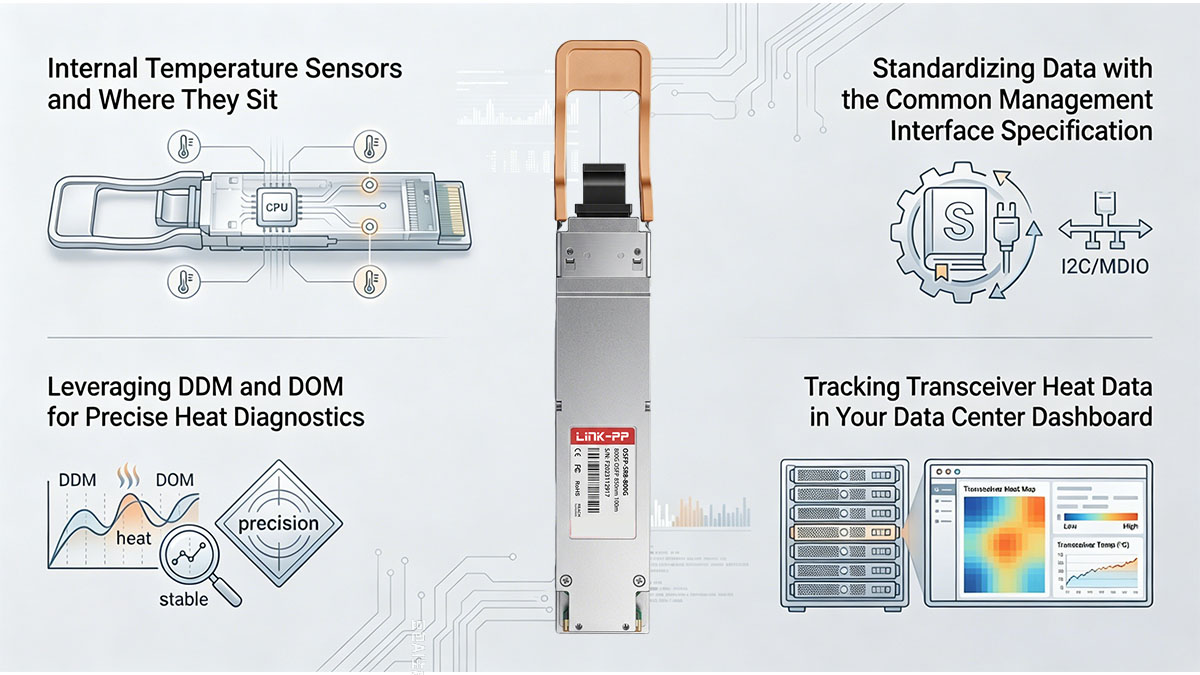
Internal Temperature Sensors and Where They Sit
Every high-performance OSFP module features built-in micro-sensors placed strategically inside the chassis to track heat directly at the source. These digital thermal sensors sit immediately adjacent to the highest-powered components, such as the laser drivers and the internal optical engine. By positioning the sensors in these critical locations, the module reports true internal temperatures rather than relying on external ambient guesses.
Leveraging DDM and DOM for Precise Heat Diagnostics
Real-time thermal monitoring relies heavily on Digital Diagnostic Monitoring (DDM), which is also known as Digital Optical Monitoring (DOM). This built-in capability allows the transceiver to constantly measure internal physical parameters alongside laser performance data. Through DDM/DOM, network operators can instantly access highly accurate temperature readouts alongside voltage and optical power levels to ensure complete health diagnostics.
Standardizing Data with the Common Management Interface Specification
To translate these raw thermal diagnostics into actionable network data, modern OSFP modules utilize the Common Management Interface Specification (CMIS). This standardized management protocol defines exactly how host switches communicate with advanced multi-lane pluggable transceivers. By standardizing the memory map and registers, CMIS ensures that any vendor switch can seamlessly read the module's internal heat diagnostics and performance states.
Tracking Transceiver Heat Data in Your Data Center Dashboard
For large-scale facilities, integrating individual transceiver data into a unified data center dashboard provides a bird's-eye view of your entire network health. These visual monitoring tools map out historical temperature trends, making it easy to spot specific switch cages that run consistently hotter than others. Analyzing these visual heat patterns helps data center teams optimize their facility-wide cooling strategies and prevent localized hardware failures.
🍀 Final Thoughts on Mastering OSFP Module Heat Control

Mastering thermal management is absolutely essential for unlocking the true potential of high-density 800G networks. By combining the integrated cooling features of the OSFP module with smart data center airflow strategies and real-time software monitoring, you can easily prevent hardware overheating. Taking these proactive steps ensures that your high-speed infrastructure remains highly reliable, efficient, and completely free from unexpected downtime.
Deploying high-quality, MSA-compliant transceivers is the most effective way to guarantee your network stays cool under heavy data loads. If you are ready to upgrade your data center infrastructure with top-tier, thermally optimized optical hardware, explore the premium selection available at the LINK-PP Official Store. Our advanced networking solutions are engineered to deliver ultimate high-speed data transmission performance while keeping heat strictly under control.