In modern industrial Ethernet environments, reliable fiber connectivity is no longer optional—it is essential for maintaining uptime, reducing interference, and supporting real-time control systems. One of the most commonly specified fiber modules in Rockwell-based networks is the Allen-Bradley 1783-SFP1GSX, a 1000BASE-SX multimode SFP designed for use in Stratix-managed switches and other industrial applications.
Whether you are designing a new automation network or maintaining an existing one, understanding how the 1783-SFP1GSX works—and more importantly, whether it is the right fit for your system—is critical. Engineers and buyers are not just searching for basic specifications; they are trying to answer practical questions like:
- Which Stratix switches support this module?
- What fiber type and distance does it support?
- Can I safely use a third-party compatible SFP instead?
- How does it perform in harsh industrial environments?
This guide is built to answer those real-world concerns with clarity and technical accuracy.
What You Will Learn From This Guide
By reading this article, you will gain:
- A clear understanding of what the 1783-SFP1GSX is and where it is used
- Detailed technical specifications, including fiber type, wavelength, and distance
- Verified compatibility with Stratix switch models
- Practical insights into OEM vs compatible SFP choices
- Installation tips and troubleshooting guidance for stable network performance
In addition, this article is structured to help both engineers and procurement professionals make confident, low-risk decisions—whether you are selecting components for a new deployment or looking for cost-effective replacement options.
Let’s start by understanding exactly what the 1783-SFP1GSX is and why it plays such an important role in industrial automation networks.
🟢 What Is The Allen-Bradley 1783-SFP1GSX?
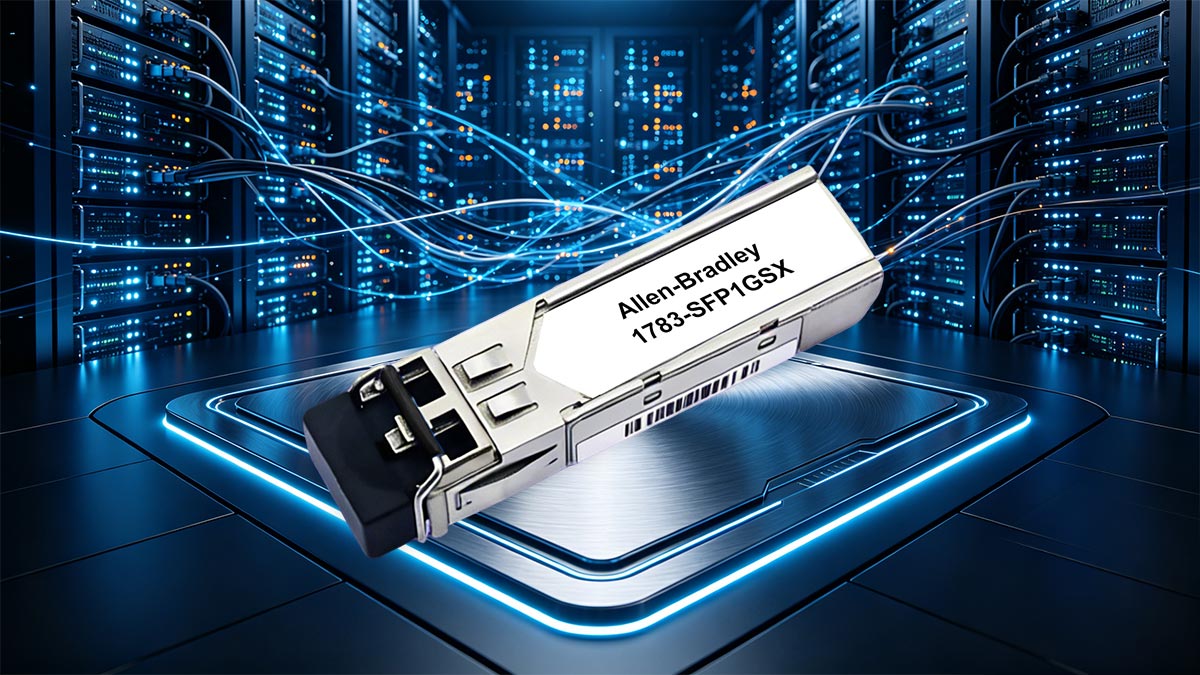
The Allen-Bradley 1783-SFP1GSX is a 1 Gigabit (1G) SFP (Small Form-Factor Pluggable) transceiver designed for 1000BASE-SX multimode fiber communication. It operates at an 850 nm wavelength and uses a dual LC connector, making it ideal for short- to medium-distance fiber links within industrial environments.
Unlike copper Ethernet connections, this multimode fiber SFP enables high-speed data transmission with strong resistance to electromagnetic interference (EMI)—a critical advantage in factories, production lines, and electrically noisy environments.
Product Overview And Primary Use Cases
The 1783-SFP1GSX is primarily used to connect industrial Ethernet switches, such as Stratix series devices, over multimode fiber optic cables (OM2/OM3/OM4). Its typical deployment scenarios include:
- Switch-to-switch uplinks within control cabinets or across plant floors
- Fiber backbone connections between network segments
- Connections in high EMI environments where copper cabling is unreliable
- Short-distance industrial fiber runs (commonly up to 550 meters depending on fiber type)
Because it supports Gigabit Ethernet (1000 Mbps) speeds, it provides a balance between performance, cost, and reliability—making it a standard choice for many automation systems.
Role In Industrial Ethernet Networks
In industrial Ethernet architectures, the 1783-SFP1GSX plays a key role in ensuring stable and interference-free communication between critical devices.
Compared to traditional copper links, fiber-based SFP modules like this one offer:
- Electrical isolation, preventing ground loops and surge damage
- Longer transmission distances without signal degradation
- Higher reliability in harsh environments, including factories with motors, drives, and heavy machinery
This makes the module especially valuable in industrial control networks, where downtime or data loss can directly impact production and safety.
When You Should Use A Multimode SFP Like 1783-SFP1GSX
Choosing a multimode SFP such as the 1783-SFP1GSX is appropriate when your network meets the following conditions:
- Distance is within short to medium range (typically ≤550 m)
- Multimode fiber infrastructure (OM2/OM3/OM4) is already in place
- Cost efficiency is important, as multimode optics are generally more affordable than single-mode solutions
- High EMI environments require fiber instead of copper
However, if your application involves long-distance transmission (kilometers) or future-proofing for higher bandwidth, a single-mode SFP (e.g., LX) may be a better fit.
By understanding what the 1783-SFP1GSX is and where it fits, you can make more informed decisions about network design, upgrades, and component selection in industrial automation systems.
🟢 1783-SFP1GSX Technical Specifications Explained
Understanding the technical specifications of the Allen-Bradley 1783-SFP1GSX is essential for ensuring compatibility, performance, and long-term reliability in industrial Ethernet deployments. Below is a clear breakdown of the most important parameters engineers evaluate before selecting this module.
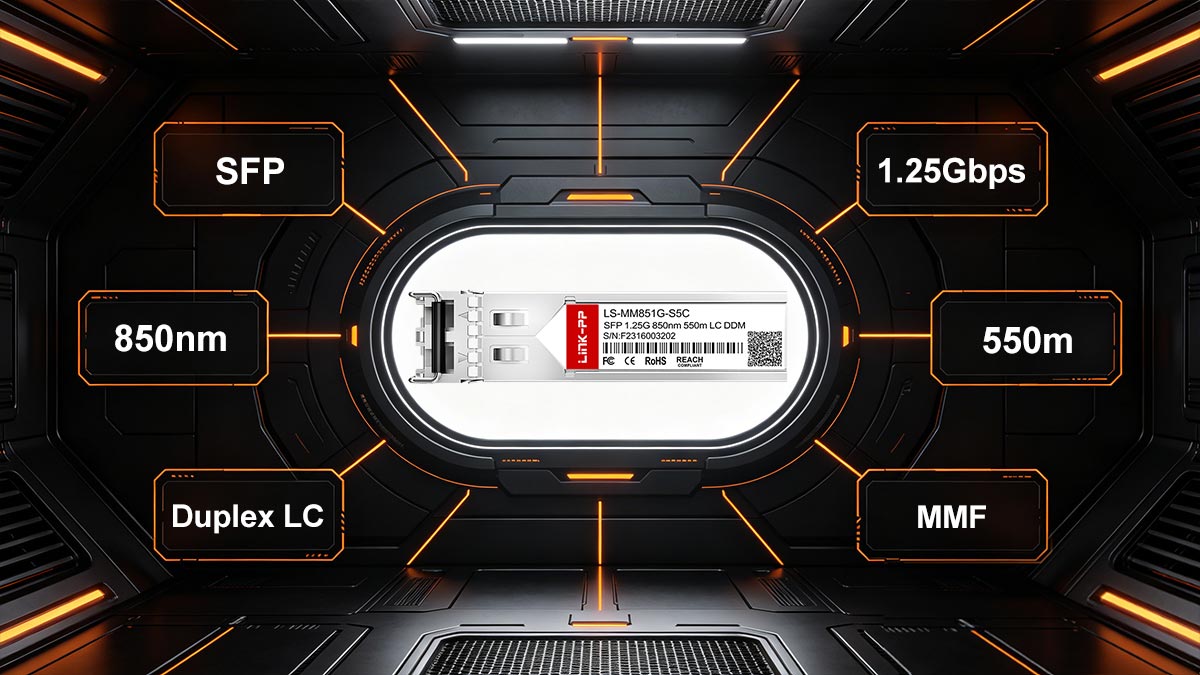
Key Specifications At A Glance
| Parameter |
Specification |
| Data Rate |
1 Gbps (1000BASE-SX) |
| Fiber Type |
Multimode Fiber (MMF) |
| Wavelength |
850 nm |
| Connector Type |
Duplex LC |
| Max Distance |
Up to 550 m (depending on fiber type) |
| Supported Fiber Standards |
OM2 / OM3 / OM4 |
| Digital Optical Monitoring |
Yes (DOM support) |
| Operating Temperature |
Industrial grade (typically -40°C to +85°C) |
| Form Factor |
SFP (Hot-swappable) |
| Application |
Industrial Ethernet / Stratix Switches |
Fiber Type, Wavelength, And Connector Details
The 1783-SFP1GSX is designed for multimode fiber (MMF) operation, using an 850 nm wavelength, which is standard for 1000BASE-SX applications.
- Multimode Fiber (OM2 / OM3 / OM4):
Optimized for short-distance, high-speed communication within buildings or industrial facilities.
- 850 nm Wavelength:
Ideal for cost-effective optical transmission over multimode fiber, commonly used in data centers and factory networks.
- Duplex LC Connector:
Uses two LC connectors—one for transmitting (TX) and one for receiving (RX)—ensuring stable bidirectional communication.
This combination makes the module highly suitable for intra-facility fiber links, such as control rooms, production lines, and distribution cabinets.
Transmission Distance And Performance Limits
The maximum transmission distance of the 1783-SFP1GSX depends on the type and quality of multimode fiber used:
- OM2 Fiber: up to ~220 meters
- OM3 Fiber: up to ~300 meters
- OM4 Fiber: up to ~400–550 meters
These distances are influenced by modal bandwidth, cable quality, and installation practices. In real-world deployments, factors such as patch panels, connectors, and bending radius can slightly reduce achievable range.
For most industrial applications, this range is more than sufficient for:
- Cabinet-to-cabinet connections
- Switch uplinks within a plant
- Short backbone links across production areas
Industrial Temperature And Reliability Factors
One of the key advantages of the 1783-SFP1GSX is its industrial-grade design, built to operate reliably in harsh environments.
- Wide Operating Temperature Range:
Typically -40°C to +85°C, suitable for factory floors, outdoor enclosures, and non-climate-controlled cabinets.
- Digital Optical Monitoring (DOM):
Provides real-time diagnostics such as:
- Optical transmit/receive power
- Module temperature
- Voltage levels
- Enhanced Durability:
Designed to withstand vibration, electrical noise, and continuous operation in demanding industrial conditions.
These features ensure that the module not only performs well under normal conditions but also supports predictive maintenance and faster troubleshooting.
By clearly understanding these specifications, you can ensure that the 1783-SFP1GSX is correctly matched to your fiber infrastructure, environmental conditions, and network performance requirements.
🟢 Which Stratix Switches Support 1783-SFP1GSX?
Compatibility is one of the most important concerns when selecting an SFP module for industrial networks. The Allen-Bradley 1783-SFP1GSX is designed specifically for the Rockwell ecosystem and is officially supported across multiple Stratix switch families, making it a flexible and widely deployable option.
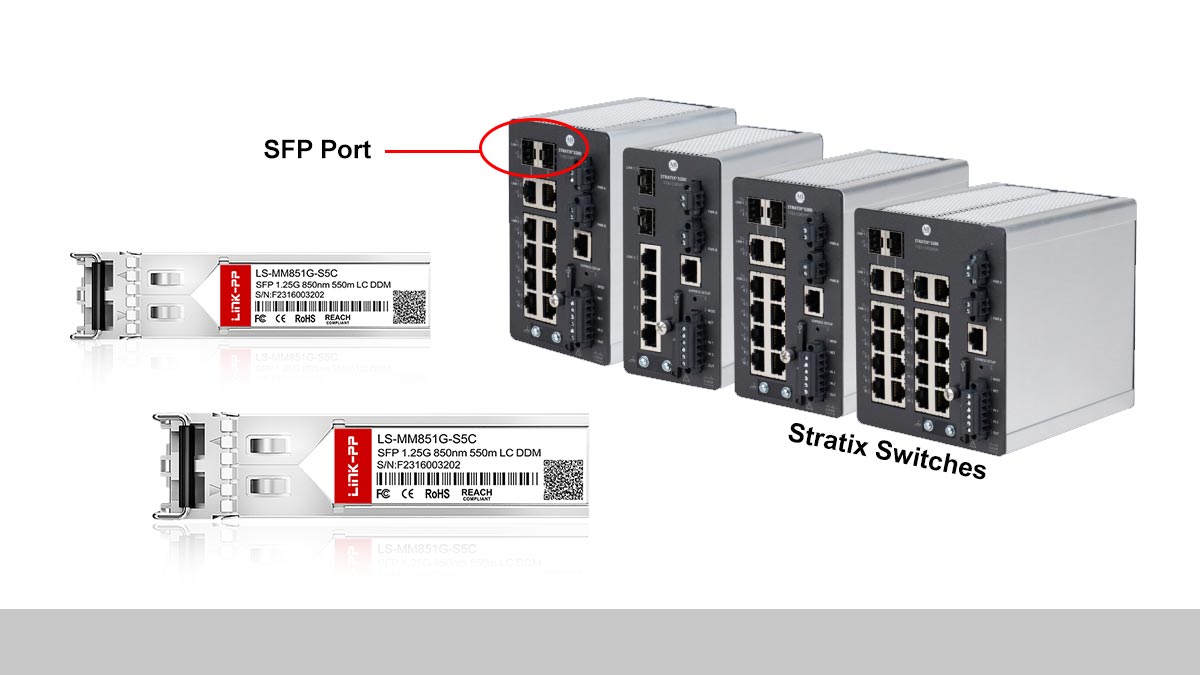
According to Rockwell Automation documentation, the 1783-SFP1GSX is supported on Stratix 5200, 5400, 5700, and 5800 series switches, as well as other Stratix platforms equipped with SFP slots.
Compatible Stratix Switch Models (5200, 5700, And More)
The 1783-SFP1GSX is part of a standardized SFP family used across Stratix managed switches. Key compatible models include:
- Stratix 5200
- Stratix 5400 / 5410
- Stratix 5700
- Stratix 5800
- Stratix 8000 / 8300 (select configurations)
Rockwell documentation confirms that Stratix switches support nearly the same SFP module set, and the 1783-SFP1GSX is explicitly listed as supported across these platforms.
This consistency is important because it allows engineers to:
- Standardize spare parts across multiple projects
- Reuse modules during upgrades or migrations
- Reduce compatibility uncertainty during deployment
In addition, Rockwell indicates that newer platforms like the Stratix 5200 are designed to replace older models such as the 5700, while maintaining compatibility with the same SFP modules.
Understanding SFP Slots And Combo Ports
To correctly deploy the 1783-SFP1GSX, it is important to understand how SFP slots and combo ports function in Stratix switches:
- SFP Slots:
Dedicated fiber ports where SFP modules are inserted. The inserted SFP determines:
- Data rate (e.g., 1G)
- Fiber type (multimode or single-mode)
- Transmission distance
- Combo Ports:
Ports that combine RJ45 (copper) and SFP (fiber) interfaces. Only one interface can be active at a time.
In practical terms, this means:
- The switch hardware provides flexibility
- The SFP module defines the actual network behavior
This is also reflected in real-world user experience:
“The SFP port… doesn’t have a fixed speed until you insert an SFP. The SFP determines the speed.”
This insight is critical when designing or troubleshooting networks—especially when mixing 100 Mbps and 1 Gbps devices.
Compatibility Considerations In Real Deployments
Even though the 1783-SFP1GSX is broadly compatible, real-world deployments still require careful validation:
1. Firmware And Hardware Alignment
Some features or SFP behaviors may depend on switch firmware versions, especially in older Stratix models.
2. Port Configuration Matters
- Ensure the correct port type (SFP vs combo) is used
- Verify speed/duplex settings in managed configurations
3. Network Design Consistency
In ring or redundant topologies (e.g., DLR), mismatched speeds can cause issues.
4. Third-Party SFP Behavior
While OEM modules like 1783-SFP1GSX are fully supported, third-party optics may trigger warnings or require configuration changes.
5. Industrial Environment Constraints
Heat, vibration, and EMI can affect overall system performance—even if the SFP itself is compatible.
In summary, the 1783-SFP1GSX offers broad, officially supported compatibility across Stratix platforms, making it a safe and standardized choice. However, successful deployment still depends on correct port usage, firmware alignment, and overall network design—not just the module itself.
🟢 1783-SFP1GSX vs. Third-Party Compatible SFP Modules
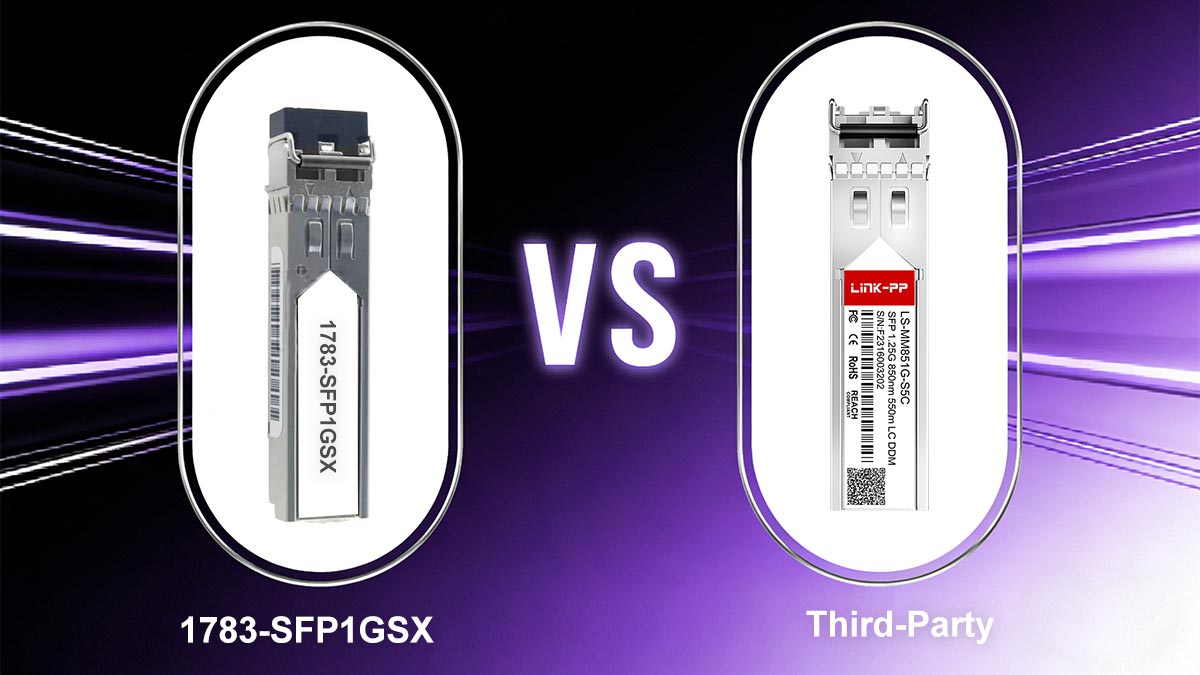
When evaluating the Allen-Bradley 1783-SFP1GSX, one of the most common real-world decisions is whether to use the original Rockwell module or a third-party compatible SFP.
This is not just a pricing question—it directly impacts network reliability, supportability, and long-term risk, especially in industrial automation environments.
Why Users Look For Alternatives
The primary driver behind third-party SFP adoption is cost efficiency.
In real user discussions, engineers often point out that OEM-branded SFPs can be significantly more expensive:
“Not using the Cisco rebranded Rockwell OEM SFPs for $500…”
As a result, many users actively look for alternatives such as FS.com or other MSA-compatible modules.
From a technical standpoint, this is possible because:
- The 1783-SFP1GSX follows the 1000BASE-SX standard
- Many third-party modules comply with MSA (Multi-Source Agreement) for interoperability
This standardization enables cross-vendor compatibility in many cases, especially for basic 1G multimode fiber links.
Compatibility Risks And Unsupported Transceiver Behavior
Despite standardization, compatibility is not guaranteed in all scenarios.
A key concern is how switches handle non-OEM modules:
- Some systems may flag unsupported transceivers
- Others may require configuration changes (e.g., CLI commands)
- In certain cases, issues may only appear under load or over time
Real-world feedback highlights this clearly:
“You may have to enter some commands… to tell it not to worry about it”
More broadly, network professionals confirm that:
- Many switches can technically accept third-party optics
- But vendor support may be limited or denied if issues arise
Another industry concern:
- Mixing vendors can introduce interoperability risks
- Some manufacturers explicitly state compatibility cannot be guaranteed across brands
Industrial vs. Commercial Grade SFP Modules
One of the most overlooked differences is environmental rating.
The original 1783-SFP1GSX is designed for industrial conditions, including:
- Wide operating temperatures (down to -40°C)
- Resistance to vibration and electrical noise
- Long-term reliability in 24/7 operation
In contrast, many third-party modules are:
- Commercial-grade (0°C to 70°C)
- Designed for data centers, not factory floors
Reddit users also highlight the importance of rugged versions:
“RGD (rugged)… gets you the highest temperature tolerance at 85°C”
This distinction is critical:
- In a controlled indoor cabinet, commercial SFPs may work fine
- In harsh environments (heat, dust, vibration), industrial-grade optics are strongly preferred
Cost vs. Reliability In Automation Environments
The final decision often comes down to short-term savings vs long-term stability.
OEM (1783-SFP1GSX):
- ✔ Guaranteed compatibility with Stratix switches
- ✔ Full vendor support
- ✔ Designed for industrial environments
- ✖ Higher upfront cost
Third-Party Compatible SFP:
- ✔ Lower cost (often significantly cheaper)
- ✔ Widely available
- ✖ Potential compatibility warnings or configuration steps
- ✖ Limited or no official support
- ✖ Risk in harsh environments if not industrial-grade
From a practical standpoint:
- For mission-critical systems, OEM modules are typically the safer choice
- For cost-sensitive or non-critical deployments, high-quality compatible SFPs can be a viable alternative
Key Takeaway
While the 1783-SFP1GSX is not technically “locked” to Rockwell hardware, real-world usage shows that compatibility, environment, and support expectations should drive your decision—not just price.
A balanced strategy many engineers follow is:
- Use OEM modules for critical links
- Use tested compatible modules for non-critical or redundant paths
This approach minimizes risk while still controlling costs—aligning with how industrial networks are actually designed and maintained.
🟢 How To Install And Verify 1783-SFP1GSX
Proper installation and verification of the Allen-Bradley 1783-SFP1GSX are critical to ensure stable communication in industrial Ethernet networks. Even though SFP modules are hot-swappable, following best practices helps avoid common issues such as link failure, signal loss, or intermittent connectivity.

Step-By-Step Installation Process
Installing the 1783-SFP1GSX is straightforward, but attention to detail is important:
- Power Safety Check
Ensure the switch is operating normally. SFPs are hot-swappable, but avoid unnecessary handling during critical operations.
- Insert The SFP Module
- Align the module with the SFP slot
- Gently slide it in until it clicks into place
- Ensure the latch mechanism is fully engaged
- Connect The Fiber Cable
- Use a duplex LC multimode fiber cable
- Match TX (transmit) to RX (receive) on the opposite device
- Verify Physical Connection
- Check that connectors are fully seated
- Ensure no excessive bending or tension on the fiber
- Observe Link LEDs
- A solid or blinking LED typically indicates link activity
- No light may indicate a connection or compatibility issue
Fiber Cabling And Connection Best Practices
Fiber performance depends heavily on proper cabling practices. Follow these guidelines to ensure optimal results:
- Use The Correct Fiber Type
Ensure compatibility with OM2, OM3, or OM4 multimode fiber.
- Maintain Clean Connectors
Dust and contamination are leading causes of signal loss. Always clean LC connectors before insertion.
- Respect Bend Radius Limits
Avoid sharp bends that can degrade signal quality.
- Avoid Mixing Fiber Types Improperly
Using mismatched fiber grades can reduce maximum transmission distance.
- Label TX/RX Clearly
Incorrect polarity is a common cause of link failure.
How To Check Link Status And DOM Data
Once installed, verifying the module’s operation is essential.
1. Check Link Status (Physical Layer):
- Confirm that the port LED is active
- Use the switch interface (web UI or CLI) to verify port status = up
2. Verify Speed And Duplex:
- Ensure the port is operating at 1 Gbps
- Check for auto-negotiation or manual configuration consistency
3. Monitor DOM (Digital Optical Monitoring):
The 1783-SFP1GSX supports DOM, which provides real-time diagnostics:
- Transmit optical power (Tx)
- Receive optical power (Rx)
- Module temperature
- Supply voltage
These metrics help detect early issues such as:
- Weak optical signal
- Fiber degradation
- Overheating modules
Common Issues And Troubleshooting Tips
Even with correct installation, issues can occur. Here are the most common problems and how to resolve them:
1. No Link Detected
- Check fiber polarity (swap TX/RX)
- Verify both ends use compatible SFP modules
- Ensure fiber type matches (multimode vs single-mode)
2. Intermittent Connection
- Inspect fiber connectors for dirt or damage
- Check for excessive cable bending
- Review environmental conditions (temperature, vibration)
3. Unsupported Transceiver Warning
- Occurs when using third-party SFPs
- May require configuration changes depending on switch model
4. Low Optical Power (DOM Alerts)
- Clean connectors
- Replace damaged fiber patch cords
- Verify distance is within supported range
5. Link Up But No Data Transmission
- Check VLAN or port configuration
- Verify network topology and device settings
Practical Insight
In real industrial deployments, most issues are not caused by the SFP itself, but by:
- Incorrect fiber connections
- Dirty connectors
- Mismatched configurations
Taking a structured approach to installation and verification ensures that the 1783-SFP1GSX delivers consistent, high-performance connectivity in demanding automation environments.
🟢 Troubleshooting Unsupported Transceiver Errors
When deploying the Allen-Bradley 1783-SFP1GSX, unsupported transceiver warnings are uncommon with OEM modules—but they can appear in mixed environments, firmware mismatches, or when testing third-party optics.
Understanding how to diagnose and resolve these alerts is essential to avoid unnecessary downtime and ensure stable network operation.
Express Setup And Basic Checks
Start with the simplest validation steps before moving into deeper diagnostics:
- Verify The Installed Module
Confirm that the correct SFP (1783-SFP1GSX) is inserted and fully seated.
- Check Port LEDs
- No light → possible connection or compatibility issue
- Blinking/solid → link detected, proceed to configuration checks
- Use Express Setup (Stratix GUI)
In Stratix switches, the web-based interface provides quick visibility:
- Port status (up/down)
- Detected SFP type
- Link speed and errors
- Reinsert The Module
Remove and reinsert the SFP to ensure proper electrical contact.
CLI Checks And Switch Configuration
For deeper troubleshooting, use the switch CLI (Command Line Interface) to validate transceiver status and behavior.
1. Check Interface Status
show interfaces status
Confirms whether the port is recognized and operational.
2. Identify Transceiver Details
show interfaces transceiver
Displays vendor info, wavelength, and module type.
3. Review Logs For Errors
show logging
Look for messages such as:
- unsupported transceiver detected
- SFP validation failed
4. Unsupported Transceiver Handling (If Applicable)
In some cases (especially with third-party modules), switches may require configuration to allow non-OEM optics.
Note: Depending on firmware and model, some Stratix switches may restrict or warn about unsupported SFPs rather than fully blocking them.
Optical Signal-Strength Verification (DOM)
Even if a transceiver is recognized, poor optical performance can trigger instability or misleading errors. This is where Digital Optical Monitoring (DOM) becomes critical.
Use CLI or web interface to check:
- Transmit Power (Tx): Ensures the module is sending sufficient signal
- Receive Power (Rx): Confirms the signal is being received correctly
- Temperature: Detects overheating in harsh environments
Typical indicators of problems:
- Rx power too low → fiber loss, dirty connectors, excessive distance
- Tx power abnormal → module fault or degradation
- Temperature too high → environmental issue or airflow problem
Common Causes Of Unsupported Transceiver Errors
In real deployments, these errors are usually linked to one of the following:
- Third-Party SFP Modules
Non-OEM optics may trigger warnings due to vendor checks
- Firmware Mismatch
Older firmware may not properly recognize newer modules
- Improper Seating Or Physical Issues
Poor contact between the SFP and port
- Fiber Or Signal Problems
Weak optical signals may appear as compatibility issues
Practical Resolution Strategy
To systematically resolve unsupported transceiver errors:
- Start with physical checks (module, fiber, cleanliness)
- Verify port status in Express Setup
- Use CLI commands to confirm detection and logs
- Check DOM values for optical health
- Update firmware if compatibility issues persist
- Replace with a known-compatible module if necessary
Unsupported transceiver errors are often symptoms, not root causes.
By combining Express Setup visibility, CLI diagnostics, and DOM data, you can quickly determine whether the issue is related to compatibility, configuration, or physical layer performance—ensuring your industrial network remains stable and reliable.
🟢 Frequently Asked Questions About 1783-SFP1GSX

1. Is 1783-SFP1GSX Multimode Or Single-Mode?
The 1783-SFP1GSX is a multimode fiber (MMF) SFP module.
It is based on the 1000BASE-SX standard, operating at an 850 nm wavelength, which is specifically designed for short-distance transmission over multimode fiber—not single-mode fiber.
If your application requires long-distance transmission (kilometers), you would need a single-mode SFP (e.g., LX type) instead.
2. What Is The Maximum Distance Of 1783-SFP1GSX?
The maximum transmission distance depends on the fiber type used:
- OM2: up to ~220 meters
- OM3: up to ~300 meters
- OM4: up to ~400–550 meters
Actual performance may vary depending on:
- Cable quality
- Connector cleanliness
- Installation conditions
For most industrial environments, these distances are sufficient for intra-plant connectivity and switch uplinks.
3. Can I Use A Cisco Or Compatible SFP Instead?
Yes, in many cases, you can use a Cisco-compatible or third-party SFP, as long as it matches:
- 1000BASE-SX standard
- 850 nm wavelength
- Multimode fiber with LC connector
However, there are important considerations:
- Compatibility is not always guaranteed
- Some switches may generate warnings
- Vendor support may be limited if non-OEM modules are used
In practice:
- Many users successfully deploy compatible SFPs
- But OEM modules like 1783-SFP1GSX offer maximum reliability and support assurance
4. Will Stratix Switches Block Third-Party SFPs?
In most cases, Stratix switches do not completely block third-party SFP modules, but they may:
- Display “unsupported transceiver” warnings
- Require configuration adjustments in some scenarios
Behavior can vary depending on:
- Switch model (e.g., 5200 vs 5700)
- Firmware version
- Network configuration
For critical industrial systems, using officially supported modules is generally recommended to avoid unexpected issues.
5. What Fiber Cable Should I Use With 1783-SFP1GSX?
You should use a duplex LC multimode fiber cable, typically one of the following:
- OM2 (shorter distances)
- OM3 (recommended for most deployments)
- OM4 (best for maximum distance and performance margin)
Key recommendations:
- Use LC-to-LC connectors
- Ensure correct TX/RX polarity
- Keep connectors clean to avoid signal loss
Choosing the right fiber cable is just as important as selecting the SFP module itself, as it directly impacts link stability and transmission performance.
🟢 When To Choose 1783-SFP1GSX For Network Upgrades
Selecting the right SFP module during a network upgrade is not just about matching specifications—it’s about aligning performance, environment, and long-term reliability. The Allen-Bradley 1783-SFP1GSX remains a practical and widely used choice for many industrial Ethernet scenarios, especially where Gigabit multimode fiber is sufficient.
Ideal Use Cases In Industrial Automation
The 1783-SFP1GSX is best suited for environments where short- to medium-distance fiber connectivity is required with strong resistance to interference.
Typical use cases include:
- Factory floor networks connecting control cabinets and PLC systems
- Switch-to-switch uplinks within Stratix-based architectures
- Production lines with high EMI, where copper cabling is unreliable
- Retrofitting legacy networks that already use multimode fiber (OM2/OM3/OM4)
- Ring or redundant topologies where stable 1G links are sufficient
Its balance of cost, performance, and industrial-grade reliability makes it a dependable option for maintaining or upgrading existing automation systems without overengineering the solution.
When To Consider Single-Mode Or Higher-Speed Alternatives
While the 1783-SFP1GSX is effective in many scenarios, it is not always the best choice. You should consider alternatives when:
- Transmission distance exceeds ~500 meters
→ Single-mode SFP (e.g., LX) is more appropriate
- Future bandwidth requirements are increasing
→ Consider 10G SFP+ modules for scalability
- New infrastructure is being deployed
→ Single-mode fiber offers better long-term flexibility
- Harsh environments require extended reach between buildings
→ Single-mode optics provide greater stability over long distances
In short, the 1783-SFP1GSX is ideal for current, well-defined 1G multimode networks, but less suitable for long-distance or future-proof, high-bandwidth designs.
Planning For Long-Term Network Stability
When planning upgrades, engineers should think beyond immediate needs and consider:
- Standardization of SFP modules across sites
- Availability of spare parts and replacements
- Environmental conditions (temperature, vibration, EMI)
- Compatibility with existing Stratix infrastructure
A common best practice is:
- Use OEM modules like 1783-SFP1GSX in critical network paths
- Use validated compatible modules in non-critical or redundant links
This hybrid approach balances cost control and operational reliability, which is essential in industrial automation.
Final Recommendation
If your network upgrade involves short-range multimode fiber connections within industrial environments, the 1783-SFP1GSX remains a safe, proven, and widely supported solution.
For engineers and buyers evaluating alternatives or sourcing reliable compatible options, you can explore high-quality industrial SFP modules through the LINK-PP Official Store, where compatibility, performance, and cost-efficiency are carefully balanced for real-world deployment needs.
Choosing the right SFP today helps ensure your network remains stable, scalable, and maintenance-friendly for years to come.