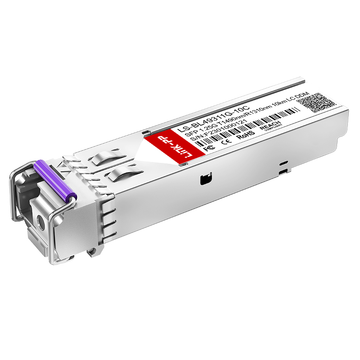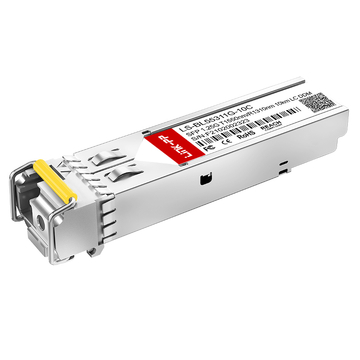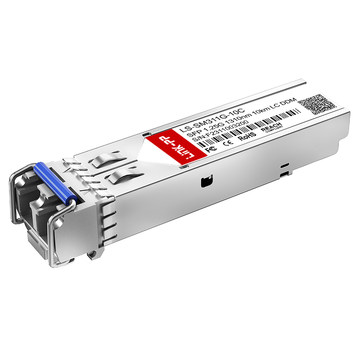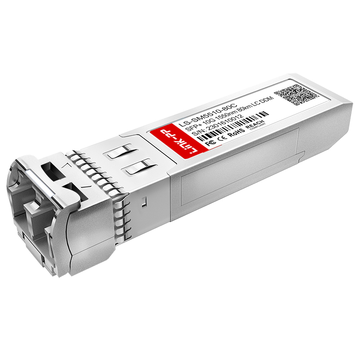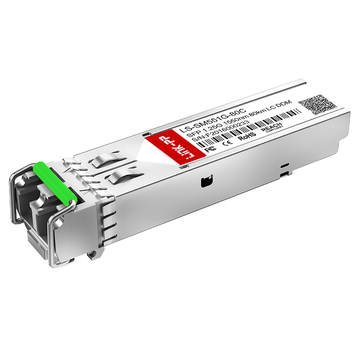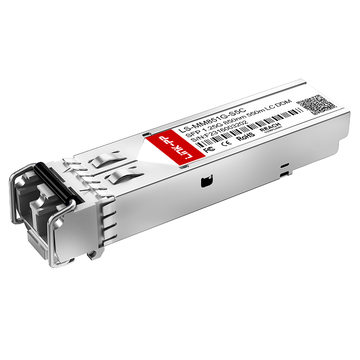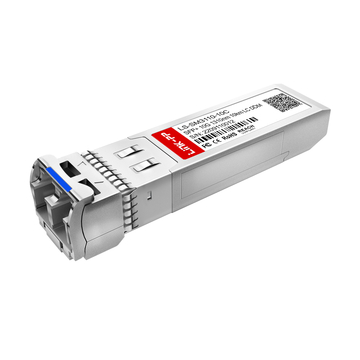
Optische transceivers zijn essentiële componenten in moderne glasvezelnetwerken, en SFP-, SFP+- en SFP28-modules worden veelvuldig gebruikt in switches, routers, servers en datacenterapparatuur. Naarmate netwerkomgevingen complexer worden, moeten engineers mogelijk meerdere transceivers tegelijk identificeren, vervangen of storingen oplossen. Treklipjes bieden een handige visuele referentie die dit proces kan versnellen, met name wanneer modules met verschillende golflengtes, vezeltypen of transmissieafstanden in hetzelfde rack zijn geïnstalleerd.
De kleur van een treklipje vertegenwoordigt echter niet altijd één universele specificatie. LINK-PP Bij SFP/SFP+/SFP28-transceivers hangt de betekenis ervan af van de modulecategorie en de optische eigenschappen. CWDM-modules gebruiken kleuren om golflengtebereiken te onderscheiden, terwijl standaard dual-fiber modules kleuren kunnen gebruiken die geassocieerd zijn met specifieke optische toepassingen. Bij BiDi-transceivers is de kleur van het lipje voornamelijk gerelateerd aan de zendgolflengte (Tx), waardoor een correcte interpretatie met name belangrijk is bij het identificeren van complementaire optische paren.
Deze handleiding legt uit hoe je dit moet interpreteren. LINK-PP De kleuren van de treklipjes en de toepassing ervan tijdens de praktische identificatie en het onderhoud van de zendontvanger. Het omvat:
- CWDM SFP/SFP+ golflengte-naar-kleur-mapping
- Standaard SFP/SFP+ single-mode en multimode kleurcategorieën
- SFP/SFP+ BiDi-kleuren gebaseerd op de zendgolflengte
- SFP28 single-mode, SR en BiDi kleurconventies
- Praktische stappen voor identificatie, vervanging en onderhoud
Inzicht in deze kleurconventies kan technici helpen om lipjes als snelle visuele referentie te gebruiken, terwijl ze tegelijkertijd het label en de technische specificaties van de module controleren vóór de implementatie.
🔔 Wat geeft de kleur van het treklipje aan op LINK-PP Zendontvangers?
De kleur van het treklipje op een LINK-PP De aanduiding SFP, SFP+ of SFP28 transceiver is voornamelijk een visuele identificatiecode, geen universele code voor datasnelheid of golflengte. De betekenis ervan hangt af van het type transceiver, de optische golflengte, het type vezel, de transmissieafstand en of de module een standaard dual-fiber- of BiDi-ontwerp gebruikt. Daarom moeten engineers de kleur gebruiken om snel een modulecategorie te bepalen en vervolgens de exacte specificaties te controleren vóór implementatie of vervanging.
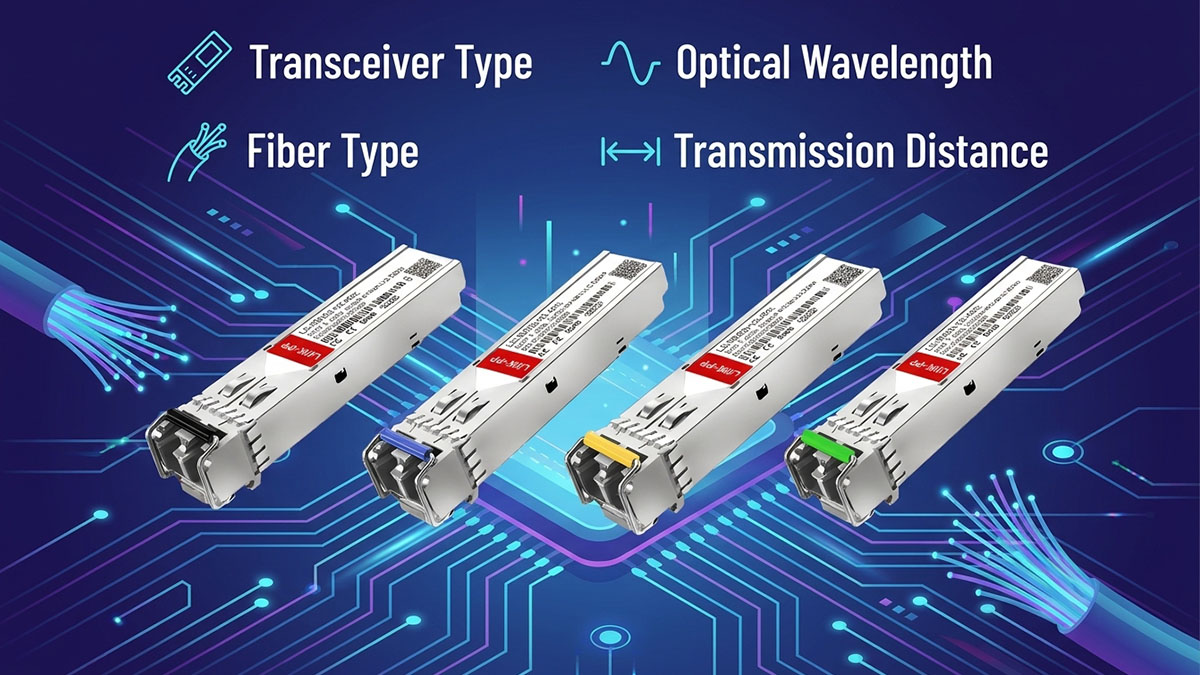
De kleur van het lipje dient als visueel identificatiemiddel.
LINK-PP Het systeem maakt gebruik van gekleurde lipjes om optische transceivers gemakkelijker te herkennen tijdens installatie, voorraadbeheer en onderhoud in het veld. Een technicus kan vaak al een eerste aanwijzing over een optische module krijgen door simpelweg naar het lipje te kijken, zonder de module uit een rack te halen of direct het volledige productlabel te controleren.
De kleur kan nuttige visuele informatie verschaffen, zoals:
- Een waarschijnlijke golflengte of golflengtebereik
- Een toepassingscategorie met één modus of meerdere modi
- Een optische toepassing voor korte of lange afstanden
- Een specifieke standaard modulecategorie
- De Tx-golflengtecategorie van bepaalde BiDi-transceivers
De kleur moet echter niet als een volledige technische specificatie worden beschouwd. Een blauw lipje kan bijvoorbeeld worden geassocieerd met verschillende 1310nm single-mode toepassingen voor SFP-, SFP+- en SFP28-modules, terwijl zwart kan duiden op diverse multimode- of specifieke BiDi-toepassingen voor korte afstanden.
Om deze reden is de kleur van het treklipje het meest geschikt als eerste identificatiekenmerk, gevolgd door verificatie van het modulelabel, het onderdeelnummer, de golflengte, het vezeltype, de afstand en de compatibiliteit met het hostapparaat.
Factoren achter LINK-PP Kleurcodering van treklipjes
De betekenis van de kleur van een treklipje wordt bepaald door de optische en toepassingskenmerken van de specifieke transceivercategorie. Verschillende factoren moeten daarom in samenhang worden beschouwd in plaats van de kleur op zichzelf te interpreteren.
De belangrijkste factoren zijn:
- Form factor: SFP-, SFP+- en SFP28-modules kunnen verwante, maar niet noodzakelijkerwijs identieke kleurconventies gebruiken.
- Optische golflengte: CWDM-modules gebruiken gekleurde lipjes om de verschillende golflengtekanalen te identificeren.
- Zendgolflengte: Bij BiDi-modules is het belangrijk om extra aandacht te besteden aan de zendgolflengte, omdat de zendfrequentie (Tx) de kleur van het treklipje bepaalt.
- Vezel type: Toepassingen met één modus en toepassingen met meerdere modi kunnen verschillende kleuren gebruiken, zelfs als het algemene doel van de module vergelijkbaar is.
- Transmissie afstand: De kleuren van de treklipjes kunnen verschillen voor SR/SX-toepassingen voor korte afstanden en ER/ZR/ZX/EX-toepassingen voor lange afstanden.
- Optische architectuur: Standaard BiDi-transceivers met twee en één vezel gebruiken verschillende identificatielogica.
Deze factoren verklaren waarom dezelfde kleur niet automatisch één vaste betekenis zou moeten krijgen voor elke kleur. LINK-PP optische transceiver.
Waarom dezelfde kleur verschillende betekenissen kan hebben
Dezelfde kleur van het lipje kan verschillende informatie weergeven, afhankelijk van de modulecategorie. Zo wordt blauw bijvoorbeeld gebruikt voor diverse conventionele single-mode toepassingen van 1310 nm, maar ook voor specifieke CWDM-golflengten en BiDi-zendgolflengten. Zwart wordt op vergelijkbare wijze gebruikt in multimode toepassingen over korte afstanden en bepaalde BiDi-configuraties.
De belangrijkste verschillen kunnen als volgt worden samengevat:
- CWDM SFP/SFP+: Kleur helpt voornamelijk bij het identificeren van de optische golflengte.
- Standaard dual-fiber SFP/SFP+: De kleur kan een optische toepassingscategorie aangeven, zoals golflengte, vezeltype, afstand en datasnelheid.
- SFP/SFP+ BiDi: De kleur wordt voornamelijk bepaald door de zendgolflengte.
- SFP28: Kleur helpt bij het onderscheiden van gangbare single-mode, multimode en BiDi-toepassingen, maar de exacte betekenis hangt nog steeds af van de optische specificatie.
Daarom moet een betrouwbaar identificatieproces de modulecategorie bepalen voordat de kleur wordt geïnterpreteerd. Dit voorkomt dat technici een CWDM-golflengteregel toepassen op een standaard SFP of een dual-fiber interpretatie gebruiken voor een BiDi-transceiver.
Bij praktisch onderhoud is de aanbevolen verificatievolgorde: kleur van het lipje → moduletype → golflengte of zendgolflengte → vezeltype → transmissieafstand → datasnelheid → onderdeelnummer → technische specificaties . Deze aanpak behoudt het snelheidsvoordeel van visuele kleurcodering en verkleint tegelijkertijd het risico op onjuiste module-identificatie.
Een snel naslagwerk voor LINK-PP Kleuren van de treklipjes voor SFP/SFP+/SFP28
De volgende referentie vat de belangrijkste punten samen. LINK-PP Deze handleiding beschrijft de kleurconventies voor de treklipjes van SFP/SFP+/SFP28-modules. Deze zijn bedoeld voor snelle visuele identificatie tijdens installatie en onderhoud. De exacte specificaties van de module moeten echter nog steeds worden gecontroleerd vóór de ingebruikname.
| Transceivercategorie | Sleutelparameter | Treklipkleur |
|---|---|---|
| CWDM SFP/SFP+ | 1270 nm - 1310 nm | Gray |
| CWDM SFP/SFP+ | 1330nm | Paars |
| CWDM SFP/SFP+ | 1350nm | Blauw |
| CWDM SFP/SFP+ | 1370nm | Groen |
| CWDM SFP/SFP+ | 1390nm | Geel |
| CWDM SFP/SFP+ | 1410nm | Oranje |
| CWDM SFP/SFP+ | 1430nm | Rood |
| CWDM SFP/SFP+ | 1450nm | Bruin |
| Standaard SFP/SFP+ | 1310nm SMF | Blauw |
| Standaard SFP/SFP+ | MMF voor korte afstanden | Zwart |
| SFP/SFP+ BiDi | Tx 1310nm/1330nm | Blauw |
| SFP/SFP+ BiDi | Tx 1270nm | Zwart |
| SFP28 | 1310nm SMF | Blauw |
| SFP28 SR | 850nm MMF | Zwart |
| 25G BiDi | Tx 1310nm/1330nm | Blauw |
| 25G BiDi | Tx 1270nm | Zwart |
De tabel biedt een handig uitgangspunt voor het identificeren van veelvoorkomende LINK-PP Optische modules worden op basis van hun uiterlijk vergeleken. Het laat ook zien waarom dezelfde kleur verschillende optische eigenschappen kan vertegenwoordigen, afhankelijk van de categorie transceiver.
Blauw kan bijvoorbeeld een conventionele single-mode module van 1310 nm aanduiden, een specifieke CWDM-golflengte of een BiDi-module met een zendgolflengte van 1310 nm of 1330 nm. Zwart kan daarentegen toepassingen voor multimode over korte afstanden of bepaalde BiDi-configuraties aangeven. De kleur moet daarom altijd worden geïnterpreteerd in de context van de betreffende modulecategorie.
Voor onderhoud in het veld is de meest betrouwbare aanpak om deze referentie te gebruiken om het mogelijke moduletype te bepalen en vervolgens het exacte onderdeelnummer, de golflengte of zend-/ontvangstgolflengten, het vezeltype, de datasnelheid, de transmissieafstand en de compatibiliteit met het hostapparaat te controleren. Dit behoudt het gemak van de kleurcodering van de treklipjes en voorkomt onjuiste identificatie op basis van alleen het uiterlijk.
🔔 LINK-PP Kleuren en golflengten van SFP/SFP+ CWDM-treklipjes
Bij LINK-PP Bij CWDM SFP/SFP+ transceivers wordt de kleur van het lipje voornamelijk gebruikt als visuele referentie voor het identificeren van de optische golflengte. De kleurenreeks omvat CWDM-golflengten van 1270 nm tot 1610 nm, hoewel sommige golflengten dezelfde kleur hebben. Technici kunnen het lipje dus gebruiken voor snelle identificatie, maar dienen de exacte golflengte te controleren op het label van de module of in de technische documentatie vóór de implementatie.
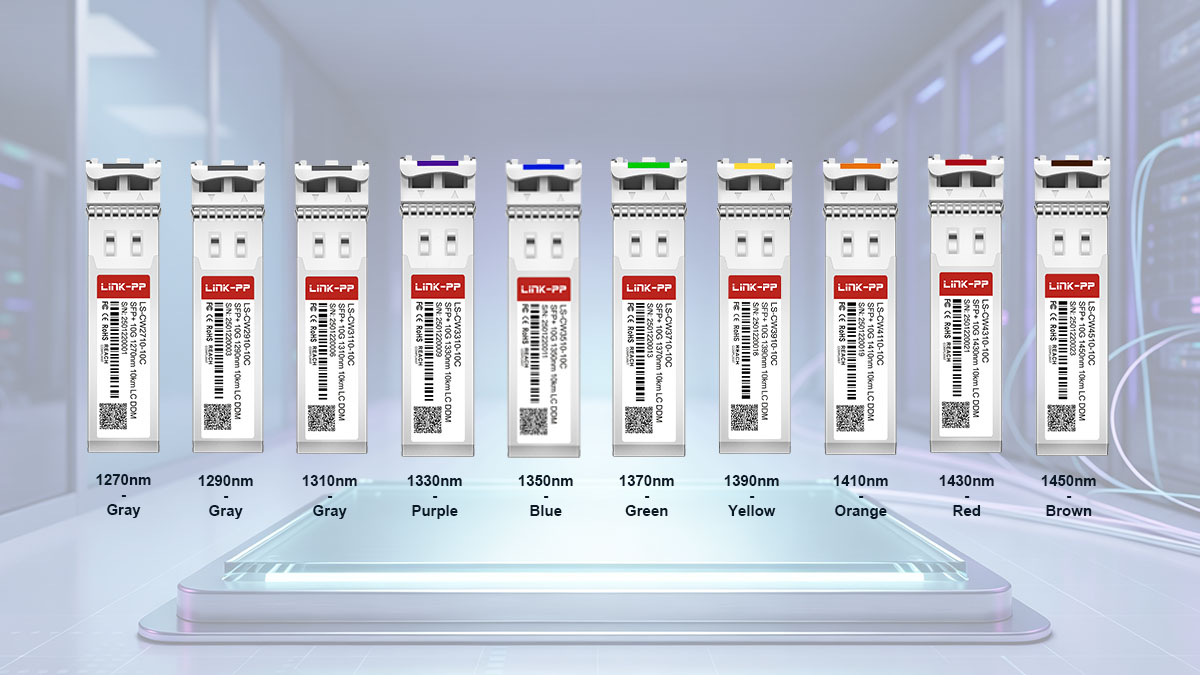
1270nm–1450nm CWDM Pull-Tab kleurenmapping
LINK-PP Er wordt een specifieke kleurvolgorde gebruikt voor CWDM SFP/SFP+ transceivers die werken van 1270 nm tot en met 1450 nm. Binnen dit bereik heeft elke golflengte van 1330 nm tot en met 1450 nm een eigen kleur, terwijl 1270 nm, 1290 nm en 1310 nm grijs zijn.
| Golflengte | Treklipkleur |
|---|---|
| 1270nm | Gray |
| 1290nm | Gray |
| 1310nm | Gray |
| 1330nm | Paars |
| 1350nm | Blauw |
| 1370nm | Groen |
| 1390nm | Geel |
| 1410nm | Oranje |
| 1430nm | Rood |
| 1450nm | Bruin |
De kleurvolgorde biedt een handige manier om de golflengte te bepalen tijdens onderhoud op rackniveau. Grijs kan echter op zichzelf geen onderscheid maken tussen 1270 nm, 1290 nm en 1310 nm. Wanneer het exacte CWDM-kanaal belangrijk is voor golflengteplanning of optische koppeling, moeten daarom de afgedrukte golflengte en het onderdeelnummer worden gecontroleerd.
1470nm–1610nm CWDM Pull-Tab kleurenmapping
Voor het conventionele CWDM-golflengtebereik van 1470 nm tot 1610 nm, LINK-PP volgt een overeenkomstige reeks van acht kleuren. Elke vermelde golflengte heeft zijn eigen kleur voor het lipje, waardoor visuele identificatie eenvoudiger is dan in het bereik van 1270 nm tot 1450 nm.
| Golflengte | Treklipkleur |
|---|---|
| 1470nm | Gray |
| 1490nm | Paars |
| 1510nm | Blauw |
| 1530nm | Groen |
| 1550nm | Geel |
| 1570nm | Oranje |
| 1590nm | Rood |
| 1610nm | Bruin |
Deze mapping stelt technici in staat om het lipje als snelle visuele referentie te gebruiken wanneer meerdere CWDM-kanalen in hetzelfde netwerk zijn geïnstalleerd. Een geel lipje in dit CWDM-bereik komt bijvoorbeeld overeen met 1550 nm, terwijl een rood lipje overeenkomt met 1590 nm. Het visuele onderscheid kan de identificatie van modules tijdens installatie, inspectie en vervanging vereenvoudigen.
Omdat de kleur van het lipje een identificatiemiddel is en geen vervanging voor de modulespecificatie, moet de exacte golflengte nog steeds worden bevestigd voordat een CWDM-module wordt aangesloten op een golflengtegevoelig optisch pad.
Hoe herken je een CWDM SFP/SFP+ aan de kleur van het lipje?
De meest betrouwbare manier om een LINK-PP Bij CWDM SFP/SFP+ wordt de kleur van het lipje als eerste aanwijzing gebruikt, waarna de optische parameters worden gecontroleerd. Deze aanpak is met name handig wanneer meerdere CWDM-kanalen naast elkaar zijn geïnstalleerd en de modules snel moeten worden geïdentificeerd.
Een praktische identificatieprocedure is als volgt:
- Identificeer het moduletype. Controleer of de transceiver een CWDM SFP of SFP+ is en geen standaard dual-fiber- of BiDi-module.
- Controleer de kleur van het lipje. Gebruik de bijbehorende LINK-PP Kleurenmapping om de mogelijke golflengte te beperken.
- Lees de afgedrukte golflengte af. Controleer de exacte golflengte die op het label van de module staat vermeld, vooral wanneer de kleur door meerdere golflengten wordt gedeeld.
- Controleer het onderdeelnummer. Vergelijk het onderdeelnummer van de module met de bijbehorende productinformatie.
- Bevestig het optische pad. Zorg ervoor dat de golflengte geschikt is voor het beoogde CWDM-kanaal en de aangesloten optische componenten.
Door deze stappen te volgen, wordt voorkomen dat het lipje als een onafhankelijke technische specificatie wordt geïnterpreteerd. De kleur biedt een snelle visuele aanwijzing, terwijl de golflengte en productinformatie de definitieve bevestiging vormen die nodig is voor de implementatie.
🔔 LINK-PP Kleuren van de treklipjes voor SFP/SFP+-standaard dual-fiber modules
Voor standaard dubbele vezel LINK-PP Bij SFP/SFP+-transceivers geven de kleuren op de lipjes over het algemeen een optische toepassingscategorie aan in plaats van een enkele golflengte. De kleur kan een combinatie van transmissiegolflengte, datasnelheid, vezeltype en afstand weergeven, dus technici moeten de kleur samen met de modulespecificatie interpreteren in plaats van deze als een universele golflengtecode te beschouwen.
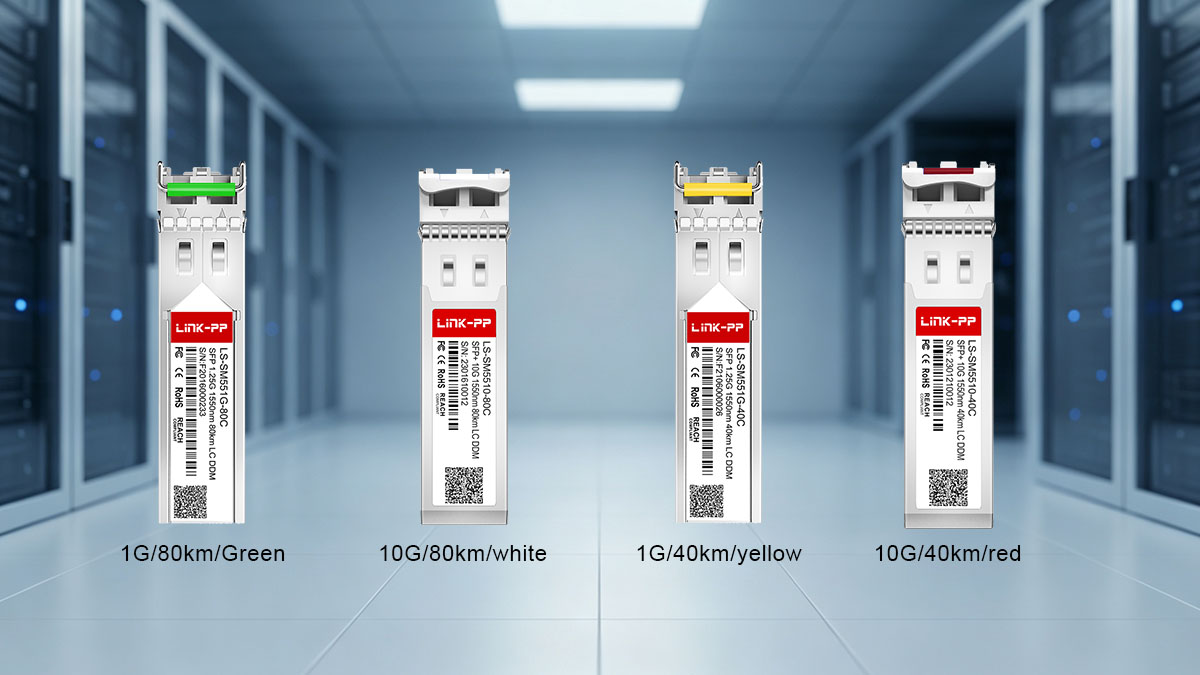
Langeafstands 1550nm SFP/SFP+ Pull-Tab Kleuren
Voor lange afstanden 1550 nm LINK-PP Bij SFP/SFP+-transceivers worden verschillende kleuren treklipjes gebruikt voor specifieke snelheids- en afstandscategorieën. Hierdoor kunnen technici verschillende optische modules met een groot bereik visueel onderscheiden, zelfs wanneer ze op dezelfde golflengte van 1550 nm werken.
| Moduletype | Typische afstand | Treklipkleur |
|---|---|---|
| SFP 1G ZX | 80km | Groen |
| SFP+ 10G ZR | 80km | Wit |
| SFP 1G EX | 40km | Geel |
| SFP+ 10G ER | 40km | Rood |
De kaart laat zien waarom de golflengte alleen de kleur van het treklipje van standaard dual-fiber modules niet kan verklaren. Zo zijn zowel de 1G ZX als de 10G ZR 80 km-klasse 1550 nm-oplossingen, maar hebben hun treklipjes verschillende kleuren. Op dezelfde manier zijn de 1G EX en 10G ER beide 40 km-klasse modules, maar gebruiken ze respectievelijk geel en rood.
Bij het identificeren van een module voor lange afstanden in het veld, moeten technici daarom rekening houden met de datasnelheid en de transmissieafstand, samen met de golflengte. Het lipje aan de voorkant kan een snelle visuele aanwijzing geven, terwijl het productlabel en de technische specificaties het exacte moduletype moeten bevestigen.
Standaard 1310nm Single-Mode SFP/SFP+ kleuren
Voor conventionele 1310nm single-mode LINK-PP SFP/SFP+-transceivers, blauw wordt in veel gangbare toepassingen gebruikt. De gedeelde kleur duidt op een brede categorie van optische signalen in één modus, en niet op een specifieke datasnelheid of transmissieafstand.
Relevante toepassingen zijn onder meer:
- 1G LX/LHX: 20 km/40 km, blauwe treklip
- 100M Single Mode: 10 km/20 km/40 km, blauwe treklip
- 10G LR: blauw treklipje
Dit betekent dat een blauw lipje kan voorkomen op single-mode transceivers van 100 MHz, 1 GHz en 10 GHz. Het mag daarom niet op zichzelf worden geïnterpreteerd als "1 GHz" of "10 GHz". De vormfactor, het modulelabel, de golflengte en de ondersteunde afstand moeten afzonderlijk worden gecontroleerd.
Voor onderhoudsteams kan blauw een handige visuele indicatie zijn dat een module tot een gangbare 1310nm single-mode categorie behoort. Bij het vervangen van een module moeten echter altijd de exacte transmissieafstand en datasnelheid vóór de installatie worden gecontroleerd.
Kleuren voor multimode SFP/SFP+ voor korte afstanden
Zwarte treklipjes worden voor diverse doeleinden gebruikt. LINK-PP Multimode-toepassingen voor korte afstanden, inclusief modules van zowel 850 nm als 1310 nm. Hierdoor is zwart een betere representatie van een toepassingscategorie dan een enkele optische golflengte.
De relevante modules omvatten:
- 1G SX: 850 nm, tot 550 m, zwarte treklip
- 100M Multimode: 1310 nm, tot 2 km, zwarte treklip
- 10G SR: 850 nm, tot 300 m, zwarte treklip
De aanwezigheid van zwart betekent dus niet automatisch dat de transceiver op 850 nm werkt. Het 100M multimode-voorbeeld laat zien dat dezelfde visuele kleur ook geassocieerd kan worden met een optische module van 1310 nm.
Bij het identificeren van een zwart treklipje tijdens netwerkonderhoud moeten technici eerst vaststellen of de module bedoeld is voor multimode of een andere toepassingscategorie, en vervolgens de golflengte, datasnelheid en maximale transmissieafstand controleren. Dit voorkomt dat een visuele kleurconventie wordt aangezien voor een volledige optische specificatie.
🔔 Wat doe je? LINK-PP Welke kleuren betekenen de treklipjes van SFP/SFP+ BiDi-chips?
Bij LINK-PP Bij SFP/SFP+ BiDi-transceivers wordt de kleur van het lipje voornamelijk bepaald door de Tx-golflengte (zendgolflengte), en niet door de Rx-golflengte (ontvangstgolflengte). Dit onderscheid is essentieel omdat BiDi-modules via één enkele vezel zenden en ontvangen met verschillende golflengten. De kleur van het lipje moet daarom worden geïnterpreteerd vanuit het perspectief van de zendende kant van de optische specificatie.
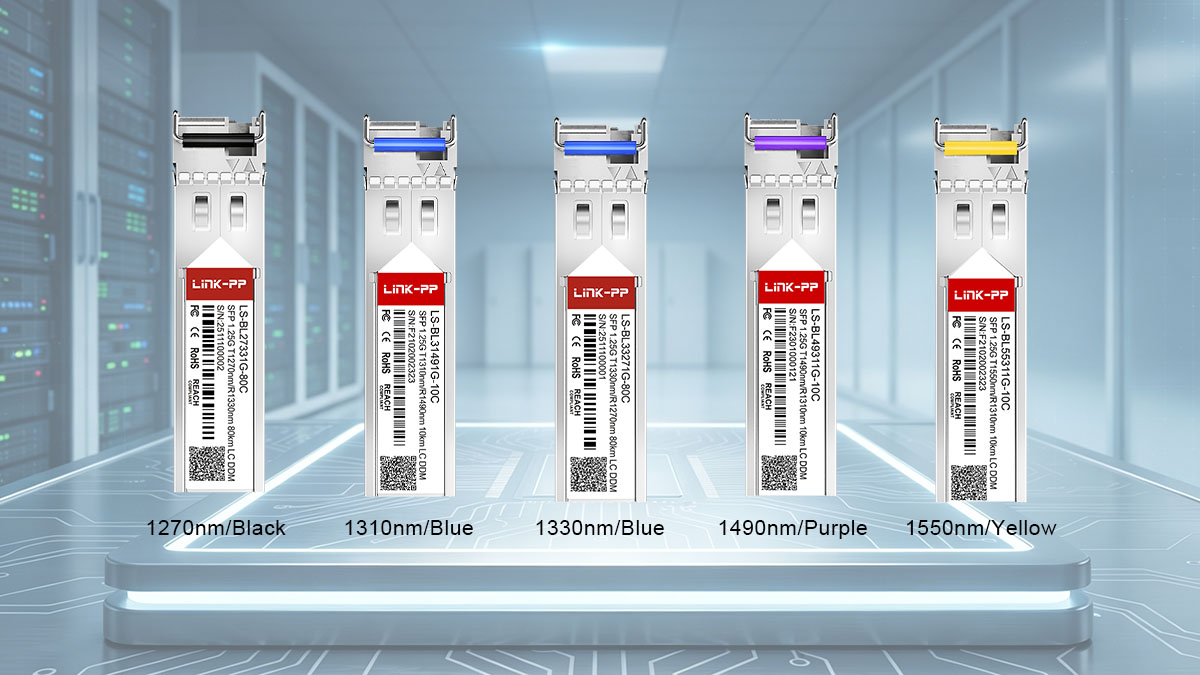
SFP/SFP+ BiDi Tx-golflengte en kleuren van de treklip
De LINK-PP De BiDi-kleurconventie koppelt specifieke kleuren van de treklipjes aan de zendgolflengte van de module. Sommige golflengten hebben dezelfde kleur, dus de kleur moet worden gebruikt als een snelle identificatiereferentie in plaats van een exacte golflengte-identificatie.
| Tx-golflengte | Treklipkleur |
|---|---|
| 1490nm | Paars |
| 1550nm | Geel |
| 1310nm | Blauw |
| 1330nm | Blauw |
| 1270nm | Zwart |
De afbeelding laat zien waarom het controleren van de Tx-specificatie belangrijker is dan alleen kijken naar het totale golflengtebereik van de module. Zo gebruiken zowel de 1310 nm als de 1330 nm Tx-golflengte een blauw lipje, terwijl 1270 nm een zwart lipje gebruikt.
Bij het identificeren van een LINK-PP Bij BiDi SFP/SFP+-toepassingen in het veld moeten technici daarom de werkelijke zendgolflengte controleren aan de hand van het modulelabel of de productspecificaties, indien het exacte optische kanaal vereist is.
Hoe herken je een BiDi-module aan de hand van het lipje?
Een BiDi-module moet anders worden geïdentificeerd dan een standaard dual-fiber SFP/SFP+. De kleur van het lipje geeft de eerste visuele aanwijzing, maar de zendgolflengte bepaalt hoe die aanwijzing moet worden geïnterpreteerd.
Een praktische identificatieprocedure is als volgt:
- Controleer of de module BiDi is. Controleer of de zendontvanger is ontworpen voor bidirectionele transmissie via één glasvezel.
- Bepaal de kleur van het lipje. Gebruik de LINK-PP BiDi-kleurmapping om de waarschijnlijke zendgolflengtecategorie vast te stellen.
- Controleer de zendgolflengte. Controleer de exacte zendgolflengte op het label van de module of in de technische documentatie.
- Controleer de ontvangstgolflengte. Bepaal de ontvangstgolflengte afzonderlijk, omdat deze de kleur van het lipje niet bepaalt.
- Controleer de aanvullende module. Controleer of de externe BiDi-transceiver de juiste complementaire zend-/ontvangstgolflengteverhouding heeft.
Dit proces is met name belangrijk wanneer meerdere BiDi-modules in hetzelfde netwerk worden ingezet. Twee modules kunnen er hetzelfde uitzien, terwijl ze verschillende optische golflengtecombinaties gebruiken. Daarom moet visuele identificatie altijd worden gevolgd door verificatie op specificatieniveau.
Waarom de kleur van het BiDi-treklipje belangrijk is tijdens onderhoud
De kleurcodering van de BiDi-treklipjes kan onderhoud in het veld versnellen doordat technici direct visueel kunnen zien welke golflengte er wordt uitgezonden. Dit is handig wanneer technici modules in dicht opeengepakte racks moeten identificeren, een defecte optische module moeten vervangen of een bestaande glasvezelverbinding moeten traceren.
De kleurenconventie kan verschillende onderhoudstaken ondersteunen:
- Snellere module-identificatie: Ingenieurs kunnen het optische type snel vaststellen voordat ze de gedetailleerde labels lezen.
- Verminderde vervangingsfouten: De kleur dient als eerste controlepunt bij het selecteren van een vervangende BiDi-module.
- Eenvoudiger beheer van golflengteparen: Informatie over de zendgolflengte helpt technici bij het onderscheiden van complementaire BiDi-modules.
- Efficiëntere probleemoplossing: Visuele identificatie kan de eerste inspectiefase verkorten bij het onderzoeken van een probleem met een optische verbinding.
De kleur van het lipje mag echter niet als enige basis worden gebruikt voor het opnieuw aansluiten van een BiDi-verbinding. De zend- en ontvangstgolflengten, het moduleonderdeelnummer, de glasvezelverbinding en de vereisten van het hostapparaat moeten worden gecontroleerd voordat het onderhoud wordt voltooid. Dit is vooral belangrijk omdat sommige BiDi-golflengten dezelfde kleur lipje hebben, waardoor de kleur alleen niet altijd de exacte optische configuratie kan onderscheiden.
🔔 Wat doe je? LINK-PP Welke kleuren betekenen de treklipjes van de SFP28?
LINK-PP De kleuren van de treklipjes van de SFP28-module bieden een snelle visuele referentie om de meest voorkomende categorieën 25G optische transceivers te onderscheiden, met name single-mode, multimode en BiDi-toepassingen. Net als bij SFP- en SFP+-modules moet de kleur niet worden geïnterpreteerd als een universele indicator van de datasnelheid of golflengte; de exacte betekenis hangt af van het optische ontwerp van de SFP28 en, voor BiDi-modules, van de zendgolflengte.
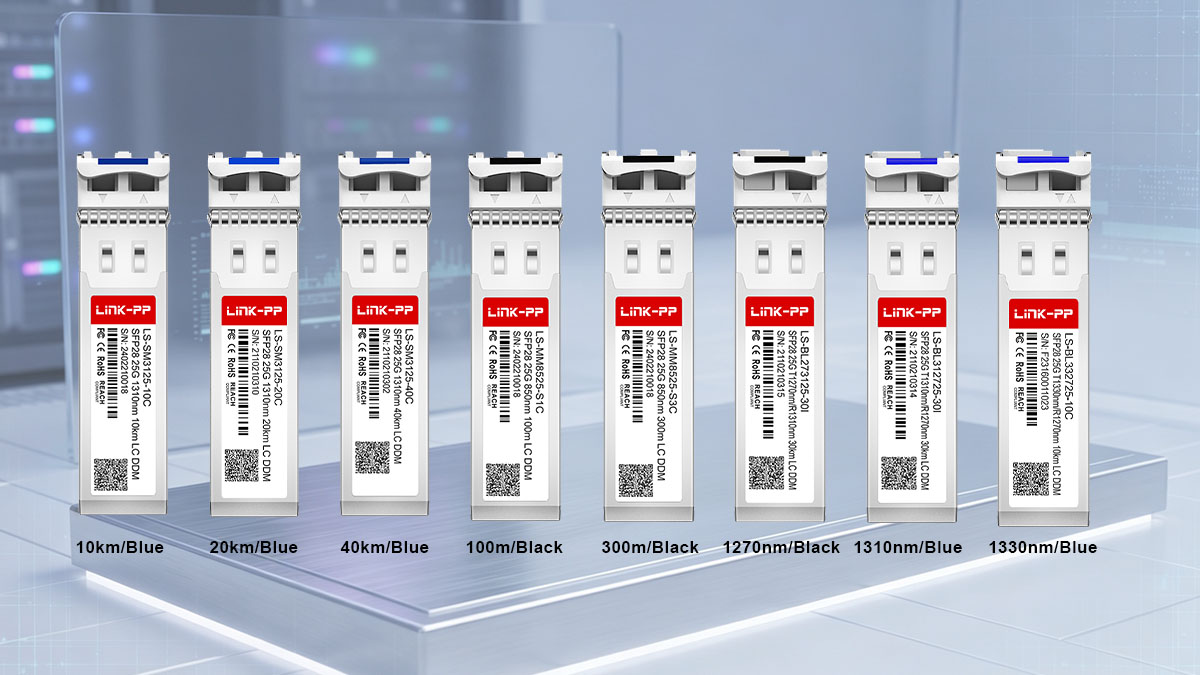
SFP28 1310nm Single-Mode Pull-Tab Kleur
Voor conventionele dual-fiber 25G SFP28 single-mode transceivers die werken op 1310 nm, LINK-PP Er wordt gebruik gemaakt van een blauw lipje dat in verschillende specificaties voor transmissieafstanden wordt gebruikt. De gedeelde kleur duidt dus op een gemeenschappelijke optische categorie in plaats van een specifieke afstand.
De volgende 25G single-mode configuraties zijn van toepassing:
- 25G 10km: Blauw treklipje
- 25G 20km: Blauw treklipje
- 25G 40km: Blauw treklipje
De consistente blauwe kleur maakt deze modules gemakkelijker te herkennen tijdens onderhoud op rackniveau. Het geeft echter geen indicatie of de module een bereik van 10 km, 20 km of 40 km ondersteunt. Technici dienen de afgedrukte golflengte, transmissieafstand, het onderdeelnummer en andere optische specificaties te controleren voordat ze een 25G SFP28-module vervangen of in gebruik nemen.
SFP28 25G SR Multimode met treklipje, kleur
Voor 25G SFP28 SR-transceivers ontworpen voor multimode-toepassingen over korte afstanden, LINK-PP Het maakt gebruik van een zwart treklipje. Deze modules werken doorgaans op 850 nm en zijn bedoeld voor multimode glasvezelverbindingen.
De relevante configuraties omvatten:
- 25G SR 850nm, 100m: Zwart treklipje
- 25G SR 850nm, 300m: Zwart treklipje
De gedeelde zwarte kleur helpt om de SFP28 SR-categorie snel te herkennen, maar geeft geen onderscheid in de ondersteunde transmissieafstand. Omdat zowel de 100m- als de 300m-variant dezelfde kleur gebruiken, moet het exacte bereik vóór de implementatie worden gecontroleerd aan de hand van de modulespecificaties.
De combinatie van 25G SR + 850nm + multimode glasvezel biedt de technische context die nodig is om het zwarte lipje correct te interpreteren. Dit voorkomt dat de kleur wordt aangezien voor een losstaande golflengte- of snelheidsindicator.
SFP28 BiDi Tx-golflengte en kleuren van de treklip
Voor 25G SFP28 BiDi-transceivers, LINK-PP De kleur van het treklipje wordt voornamelijk gekoppeld aan de zendgolflengte van de module. Dit volgt hetzelfde basisidentificatieprincipe als dat gebruikt wordt voor LINK-PP SFP/SFP+ BiDi-optiek, waarbij de zendgolflengte belangrijker is voor de kleurinterpretatie dan de ontvangstgolflengte.
| Tx-golflengte | Treklipkleur |
|---|---|
| 1310nm | Blauw |
| 1330nm | Blauw |
| 1270nm | Zwart |
De kaart laat zien dat 1310 nm en 1330 nm blauw delen, terwijl 1270 nm zwart gebruikt. Daarom kan een technicus niet altijd de exacte zendgolflengte bepalen op basis van de kleur alleen.
Voor praktisch onderhoud van SFP28 BiDi-modules is het aan te raden om eerst de module als BiDi te identificeren, het lipje als visuele aanwijzing te gebruiken en vervolgens de exacte zend-/ontvangstgolflengtecombinatie te controleren. Dit is met name belangrijk bij het identificeren van complementaire modules, omdat de juiste golflengtekoppeling essentieel is voor het tot stand brengen van een bidirectionele verbinding via één glasvezel.
🔔 Hoe gebruik je de kleuren van de treklipjes voor de identificatie van SFP/SFP+/SFP28-chips?
De kleur van het lipje kan de identificatie van SFP/SFP+/SFP28-modules versnellen, maar moet als uitgangspunt worden gebruikt en niet als definitieve verificatiemethode. Een betrouwbaar identificatieproces combineert de zichtbare kleur met het moduletype, de golflengte of zendgolflengte, het vezeltype, de transmissieafstand, de datasnelheid en het onderdeelnummer.
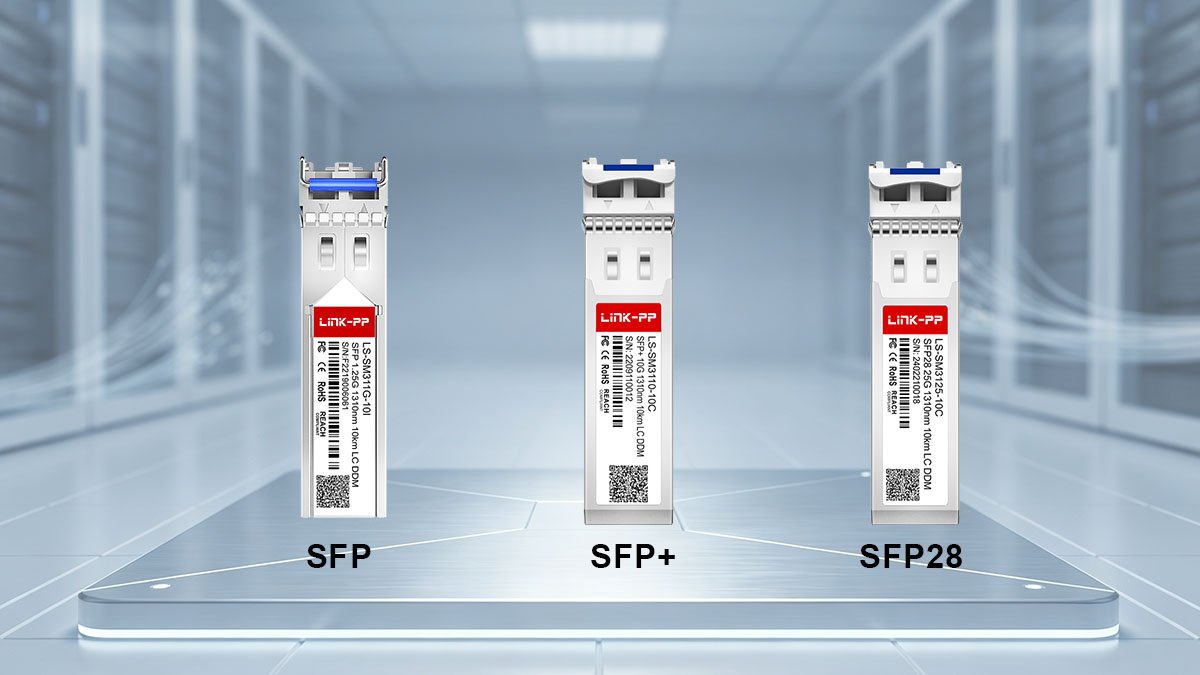
Stap 1: Bepaal de vormfactor van de zendontvanger
De eerste stap is bepalen of de module een SFP-, SFP+- of SFP28-transceiver is. De vormfactor bepaalt de juiste kleurconventie en voorkomt dat technici een kleurregel van de ene modulefamilie op de andere toepassen.
Controleer de module op:
- SFP: Wordt veel gebruikt voor optische netwerktoepassingen van 100 Mbps of 1 Gbps.
- SFP+: Wordt veel gebruikt voor 10G optische verbindingen.
- SFP28: Ontworpen voor 25G optische netwerktoepassingen.
Dit onderscheid is met name belangrijk omdat dezelfde kleur van het treklipje kan voorkomen bij verschillende uitvoeringen, terwijl deze verschillende transmissiespecificaties vertegenwoordigen.
Stap 2: Bepaal de optische toepassing
Nadat u de vormfactor hebt vastgesteld, bepaalt u welk type optische module u gebruikt. Dit geeft de context die nodig is om de kleur van het treklipje correct te interpreteren.
Controleer of de zendontvanger:
- Een standaard dual-fiber module
- Een CWDM-module
- Een BiDi-module
- Een module met één modus
- Een multimode module
Een blauw lipje kan bijvoorbeeld duiden op een conventionele single-mode toepassing van 1310 nm, maar blauw kan ook overeenkomen met specifieke CWDM-golflengten of BiDi-zendgolflengten. Door eerst de optische toepassing te identificeren, wordt verwarring tussen deze verschillende conventies voorkomen.
Stap 3: Controleer de golflengte of zendgolflengte
De volgende stap is het controleren van de optische golflengte die op de module wordt weergegeven. Bij standaard- en CWDM-transceivers helpt de golflengte bij het vaststellen van het optische kanaal of de toepassingscategorie. Bij BiDi-modules moet speciale aandacht worden besteed aan de zendgolflengte (Tx), omdat de kleur van het lipje voornamelijk gebaseerd is op de zendgolflengte.
De verificatie moet het volgende omvatten:
- Exacte werkingsgolflengte
- Zendgolflengte voor BiDi-modules
- Rx-golflengte voor BiDi-modules
- Of de golflengte tot een CWDM-kanaal behoort
- Of de golflengte overeenkomt met het beoogde optische pad.
Deze stap is vooral belangrijk wanneer meerdere golflengten dezelfde kleur hebben voor het lipje dat je eruit trekt, zoals bij CWDM-modules van 1270 nm, 1290 nm en 1310 nm.
Stap 4: Controleer de afstand en de datasnelheid
De transmissieafstand en de datasnelheid helpen bij het onderscheiden van modules met vergelijkbare of identieke kleuren van de treklipjes. Een visuele kleur kan echter niet betrouwbaar bepalen of een optisch systeem bedoeld is voor 100M, 1G, 10G of 25G-werking, noch kan het onafhankelijk het maximale bereik bevestigen.
Controleer vóór de implementatie:
- Datasnelheid: 100M, 1G, 10G of 25G
- Transmissie afstand: Bijvoorbeeld 100m, 300m, 10km, 20km, 40km of 80km.
- Vezel type: Single-mode glasvezel of multimode glasvezel
- Optische standaard: Zoals SX, LX, SR, LR, ER, ZR of ZX, indien van toepassing.
Deze parameters bieden de technische context die nodig is om visueel gelijkende modules te onderscheiden en te bepalen of de transceiver geschikt is voor de beoogde verbinding.
Stap 5: Controleer het onderdeelnummer en de technische specificaties.
De laatste stap is het controleren van het exacte onderdeelnummer en het vergelijken van de technische specificaties met de geplande implementatie. Dit is de belangrijkste verificatiefase, omdat de kleur van het lipje geen vervanging is voor de specificaties van de fabrikant.
Controleer vóór het installeren of vervangen van een SFP/SFP+/SFP28-transceiver het volgende:
- Product- of onderdeelnummer
- Vormfactor en datasnelheid
- Golflengte of zend-/ontvangstgolflengte
- Vezel type
- Transmissie afstand
- Connector en optische interface
- Compatibiliteit van het hostapparaat
- Toepasselijke technische specificaties
Door deze volgorde aan te houden, wordt de kleur van het treklipje een praktische onderhoudssnelkoppeling zonder dat het de enige identificatiemethode is. In een dicht optisch netwerk kan dit technici helpen modules sneller te identificeren en tegelijkertijd het risico verkleinen dat een optisch element met de verkeerde golflengte, vezeltype, reikwijdte of operationele specificatie wordt geïnstalleerd.
🔔 Kleur van het treklipje versus het label op de module: welke moet je vertrouwen?
Bij het identificeren van een SFP/SFP+/SFP28-transceiver voor installatie, vervanging of probleemoplossing, moeten het label en de technische specificaties van de module altijd voorrang hebben boven de kleur van het lipje. De kleur van het lipje is handig voor een snelle visuele classificatie, maar biedt niet alle parameters die nodig zijn om te bevestigen of een module geschikt is voor een specifieke optische verbinding.
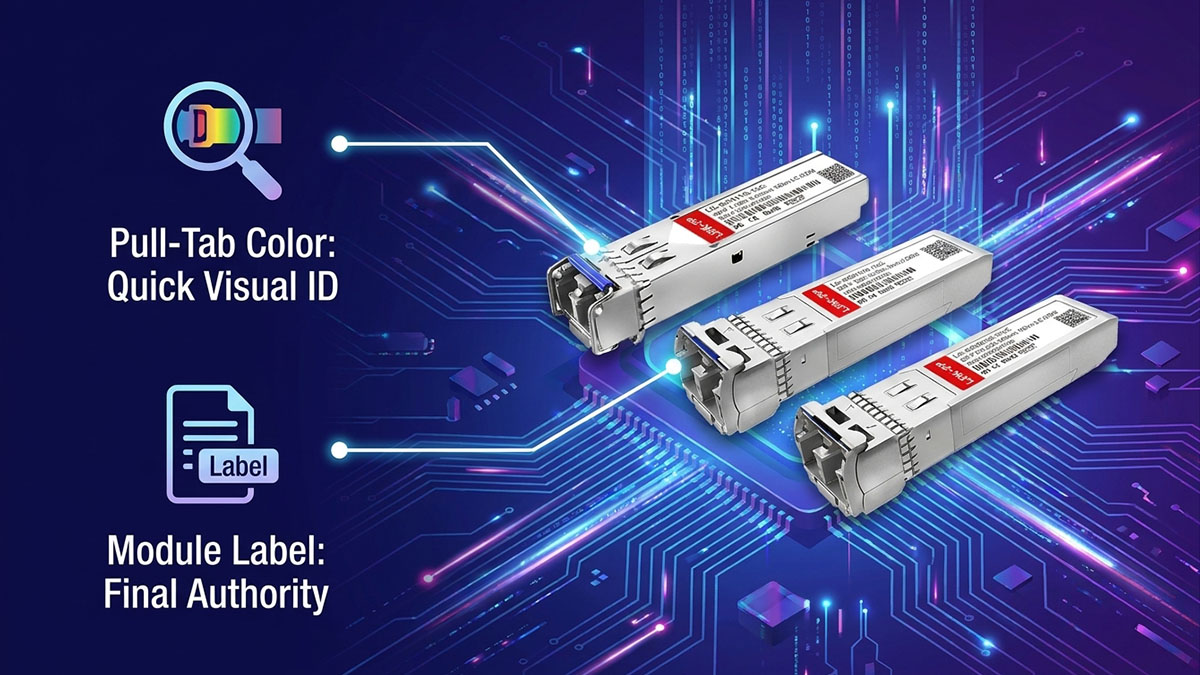
Wat de kleur van het lipje je snel kan vertellen
De kleur van het lipje is vooral waardevol tijdens de eerste identificatiefase, omdat technici hiermee in één oogopslag de modulecategorie kunnen bepalen. Dit is met name handig in racks met een hoge dichtheid, waar veel optische transceivers dicht bij elkaar zijn geïnstalleerd.
De kleur van het lipje kan snel een indicatie geven van:
- Waarschijnlijke golflengtecategorie: Vooral handig voor LINK-PP CWDM-modules.
- Optische toepassing: Kleuren kunnen helpen bij het onderscheiden van bepaalde standaardtoepassingen voor lange of korte afstanden.
- Vezeltypecategorie: Sommige kleuren zijn gekoppeld aan single-mode of multimode toepassingen.
- BiDi Tx-golflengtecategorie: Bij BiDi-modules kan de kleur een eerste aanwijzing geven over de zendgolflengte.
- Module-identificatie: Consistente kleuren kunnen visuele inspectie en voorraadbeheer versnellen.
Deze aanwijzingen zijn waardevol voor veldoperaties, maar ze moeten als voorlopige informatie worden beschouwd. Verschillende golflengtes of specificaties kunnen dezelfde kleur hebben, waardoor een treklipje niet altijd de exacte configuratie van een zendontvanger kan identificeren.
Welke kleur van het lipje kan niet worden bevestigd?
De kleur van het lipje geeft onvoldoende informatie om volledige optische of hostapparaatcompatibiliteit vast te stellen. Zelfs als de kleur overeenkomt met een verwachte modulecategorie, moeten aanvullende specificaties worden gecontroleerd vóór de implementatie.
Alleen de kleur kan niet betrouwbaar bevestigen:
- Exacte transmissieafstand
- Ondersteunde datasnelheid
- De exacte werkingsgolflengte wanneer meerdere golflengten een kleur delen.
- Compatibiliteit van het hostapparaat
- Optisch vermogensbudget
- Connector configuratie
- DOM/DDM-parameters
- Exact onderdeelnummer
Blauw kan bijvoorbeeld geassocieerd worden met diverse 1310nm single-mode toepassingen in verschillende SFP-, SFP+- en SFP28-configuraties. Evenzo kan zwart voorkomen bij meerdere multimode- en BiDi-toepassingen voor korte afstanden. De kleur verkleint dus het identificatiebereik, maar maakt het niet compleet.
Aanbevolen controlemethode
De veiligste aanpak is om de kleur van het lipje te gebruiken voor snelle visuele herkenning en vervolgens de technische informatie van de module stapsgewijs te controleren. Deze methode combineert de snelheid van visuele identificatie met de nauwkeurigheid van verificatie op basis van specificaties.
Een praktische verificatieprocedure is als volgt:
Treklipje kleur → Moduletype → Golflengte/zendgolflengte → Vezeltype → Transmissieafstand → Datasnelheid → Artikelnummer → Datasheet
Begin met de kleur van het lipje om de waarschijnlijke categorie te bepalen en identificeer vervolgens of de module SFP, SFP+, SFP28, CWDM, standaard dual-fiber of BiDi is. Controleer daarna de golflengte of zendgolflengte en het type vezel en de transmissieafstand.
Controleer tot slot de datasnelheid, het exacte onderdeelnummer en de toepasselijke technische specificaties. Bij BiDi-modules verdient de relatie tussen de zend- en ontvangstgolflengte bijzondere aandacht, omdat een correcte golflengteafstemming essentieel is voor bidirectionele transmissie via één vezel.
Deze aanpak maakt de kleur van het treklipje nuttig zonder er te veel op te vertrouwen. Bij routineonderhoud kan kleur de visuele inspectie versnellen, terwijl het modulelabel en de technische documentatie de gezaghebbende bronnen blijven voor de uiteindelijke identificatie en implementatiebeslissingen.
🔔 Veelgemaakte fouten bij het tolken LINK-PP Kleuren van de treklipjes
De meest voorkomende fouten treden op wanneer ingenieurs een LINK-PP De kleur van het lipje dient als universele technische code in plaats van als visueel identificatiemiddel. Voor een correcte interpretatie moeten de modulecategorie, golflengte of zendgolflengte, vezeltype, transmissieafstand en datasnelheid gezamenlijk in overweging worden genomen.
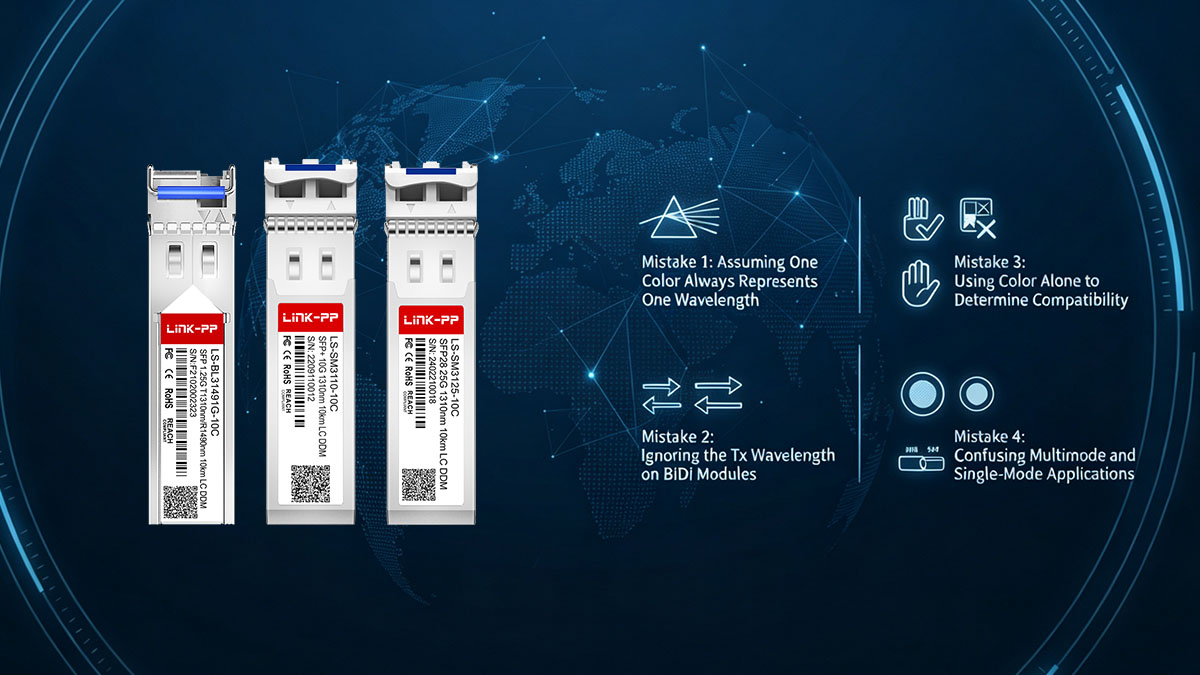
Fout 1: Ervan uitgaan dat één kleur altijd één golflengte vertegenwoordigt.
Een enkele kleur van het lipje komt niet noodzakelijkerwijs overeen met één specifieke golflengte voor alle varianten. LINK-PP SFP/SFP+/SFP28-transceivers. De kleurconventie verschilt afhankelijk van de modulecategorie en de optische toepassing.
Bijvoorbeeld:
- Grijs: Kan 1270 nm, 1290 nm of 1310 nm vertegenwoordigen in het CWDM-bereik van 1270 nm tot 1450 nm.
- Blauw: Kan 1310nm single-mode toepassingen identificeren, maar komt ook overeen met specifieke CWDM- en BiDi-zendgolflengten.
- Zwart: Kan worden gebruikt voor multimode-toepassingen over korte afstanden, evenals voor bepaalde BiDi-configuraties.
Dit betekent dat technici eerst moeten vaststellen of de module CWDM, standaard dual-fiber of BiDi is, voordat ze de kleur interpreteren. De exacte golflengte moet vervolgens worden bevestigd aan de hand van het label of de technische specificaties van de module.
Fout 2: Het negeren van de zendgolflengte op BiDi-modules
BiDi-transceivers gebruiken één enkele vezel voor bidirectionele communicatie en zenden en ontvangen op verschillende golflengten. LINK-PP Bij BiDi-modules wordt de kleur van het treklipje voornamelijk bepaald door de zendgolflengte (Tx). Het gebruik van de ontvangstgolflengte (Rx) om de kleur te interpreteren kan daarom leiden tot onjuiste identificatie.
De juiste aanpak is als volgt:
- Controleer of de transceiver een BiDi-module is.
- Bepaal de zendgolflengte.
- Stem de zendgolflengte af op de bijbehorende kleur van het lipje.
- Controleer de Rx-golflengte afzonderlijk.
- Controleer de complementaire golflengteverhouding van de externe module.
Dit onderscheid is vooral belangrijk wanneer meerdere BiDi-modules in hetzelfde rack zijn geplaatst. Een kleur kan een nuttige aanwijzing geven, maar mag het controleren van de volledige Tx/Rx-configuratie niet vervangen.
Fout 3: Alleen op kleur afgaan om de compatibiliteit te bepalen.
De kleur van het lipje geeft niet aan of een SFP/SFP+/SFP28-transceiver compatibel is met een bepaalde switch, router, server of ander netwerkapparaat. Compatibiliteit hangt af van technische en platformspecifieke factoren die niet door het lipje worden weergegeven.
Vóór de installatie moeten technici het volgende controleren:
- Compatibiliteit van het hostapparaat
- Datasnelheid
- optische golflengte
- Vezel type
- Transmissie afstand
- Modulevormfactor
- Fabrikantnummer:
- Relevante technische specificaties
Twee blauwe lipjes kunnen bijvoorbeeld duiden op modules met verschillende datasnelheden of transmissieafstanden. Door de gedeelde kleur te interpreteren als bewijs dat de modules uitwisselbaar zijn, kan dit leiden tot een ongeschikte vervanging.
Fout 4: Multimode- en singlemode-toepassingen door elkaar halen
Een andere veelgemaakte fout is de aanname dat een kleur direct het vezeltype of de golflengte aangeeft. LINK-PP Zwart wordt gebruikt voor diverse multimode-toepassingen over korte afstanden, maar zwart is niet uitsluitend een 850nm-identificatiekleur.
Bijvoorbeeld:
- 1G SX: 850 nm, multimode, 550 m, zwart
- 10G SR: 850 nm, multimode, 300 m, zwart
- 100M Multimode: 1310 nm, 2 km, zwart
Deze voorbeelden laten zien dat zwart meer dan één golflengte kan omvatten. Op dezelfde manier wordt blauw gebruikt voor verschillende conventionele single-mode toepassingen bij 1310 nm, maar komt het ook voor in andere kleurschema's.
De juiste interpretatie is daarom gebaseerd op de volledige toepassingscontext en niet alleen op de kleur. Door het vezeltype, de golflengte, de datasnelheid en de transmissieafstand te controleren, wordt een betrouwbaardere identificatie verkregen.
Door deze vier fouten te vermijden, worden de kleuren van de treklipjes veel nuttiger in de praktijk van netwerkoperaties. De kleur moet dienen als een snelle visuele referentie, terwijl het label op de module en de technische specificaties de definitieve bevestiging bieden die nodig is voor installatie, vervanging en probleemoplossing.
🔔 Aanbevolen onderhoudspraktijken voor lipjes op basis van kleur
De kleuren van de lipjes kunnen het onderhoud van SFP/SFP+/SFP28-modules versnellen wanneer ze als visuele referentie worden gebruikt in combinatie met de juiste modulegegevens en technische specificaties. De meest effectieve aanpak is om kleur te gebruiken voor snelle identificatie, terwijl voor installatie-, vervangings- en probleemoplossingsbeslissingen wordt vertrouwd op geverifieerde optische parameters.
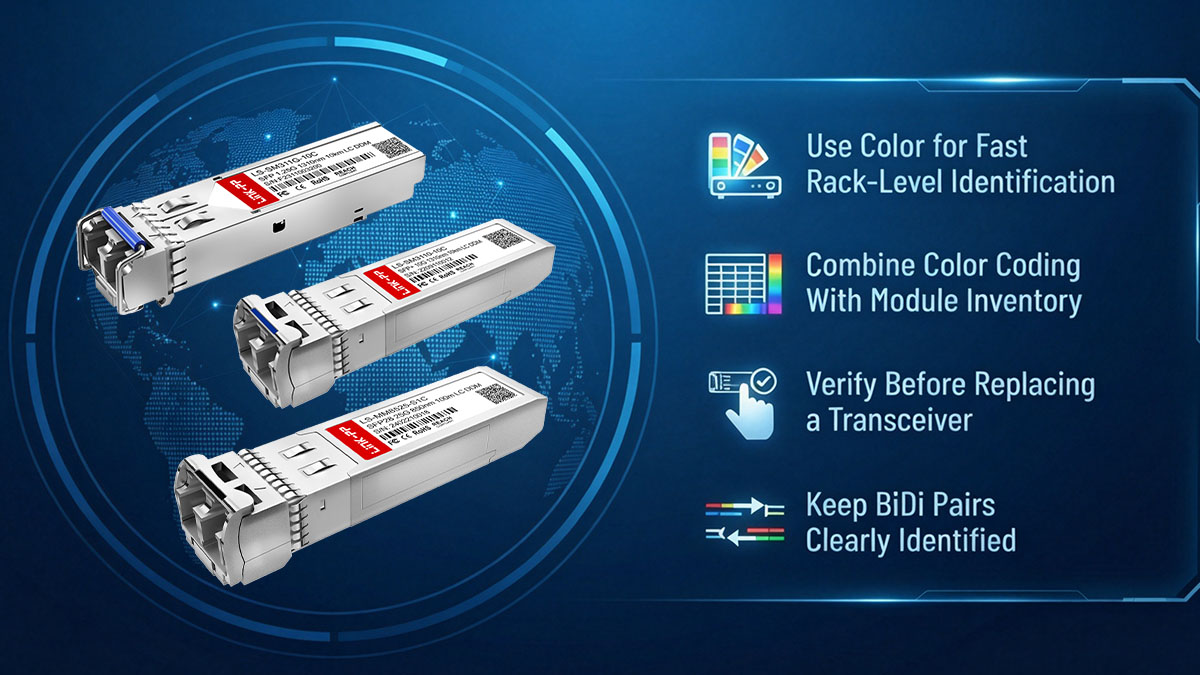
Gebruik kleur voor snelle identificatie op rackniveau.
In een netwerkrack met veel modules moeten technici mogelijk talloze optische transceivers met verschillende snelheden, golflengtes en transmissieafstanden inspecteren. De kleuren van de lipjes bieden een directe visuele aanwijzing die de tijd verkort die nodig is om een specifieke modulecategorie te vinden.
Tijdens routineonderhoud kunnen technici het volgende doen:
- Groepeer visueel vergelijkbare zendontvangers op basis van de optische toepassing.
- Vind snel modules die inspectie of vervanging vereisen.
- Gebruik de kleuren van de lipjes van de kabelbinders als eerste aanwijzing bij het traceren van glasvezelverbindingen.
- Vergelijk de geïnstalleerde modules met de rackdocumentatie tijdens visuele inspecties.
- Verminder onnodige handelingen met naburige zendontvangers.
Identificatie op basis van kleur is met name handig wanneer meerdere SFP/SFP+/SFP28-modules in aangrenzende poorten zijn geïnstalleerd. Technici dienen echter de exacte module-informatie te controleren voordat ze een optische module fysiek verwijderen of opnieuw aansluiten.
Combineer kleurcodering met module-inventaris.
De kleur van een lipje wordt pas echt nuttig als deze wordt ondersteund door nauwkeurige voorraadgegevens. Een onderhoudsdatabase moet de technische informatie bewaren die kleur niet kan overbrengen.
Nuttige inventarisvelden zijn onder andere:
- Fabrikantnummer:
- Modulevormfactor
- Datasnelheid
- Golflengte of zend-/ontvangstgolflengte
- Vezel type
- Transmissie afstand
- Locatie van het hostapparaat of de poort
Door deze parameters vast te leggen, kunnen technici het lipje gebruiken als een snelle visuele controle in plaats van op hun geheugen te vertrouwen. Het maakt het ook gemakkelijker om een geschikte vervanging te vinden wanneer meerdere modules vergelijkbare kleuren hebben.
Controleer dit voordat u een zendontvanger vervangt.
Een overeenkomende kleur van het lipje betekent niet automatisch dat twee optische modules uitwisselbaar zijn. Voordat technici een SFP-, SFP+- of SFP28-transceiver vervangen, moeten ze de volledige technische specificaties van de bestaande verbinding vergelijken.
De vervangingscheck moet het volgende bevatten:
- Zorg dat de vormfactor en de datasnelheid overeenkomen.
- Stem de optische golflengte of de zend-/ontvangstgolflengten op elkaar af.
- Kies het gewenste vezeltype.
- Houd waar nodig rekening met of overschrijd de vereiste transmissieafstand.
- Controleer de optische interface en de connector.
- Controleer de compatibiliteit van het hostapparaat.
- Controleer het exacte onderdeelnummer en de technische specificaties.
Deze verificatie is vooral belangrijk wanneer twee modules dezelfde kleur treklipje hebben, maar verschillende transmissieafstanden of optische configuraties. De kleur kan het eerste screeningproces versnellen, maar het overeenkomen van de specificaties bepaalt of de vervanging geschikt is.
Zorg ervoor dat BiDi-paren duidelijk herkenbaar blijven.
Het onderhoud van BiDi-verbindingen vereist extra aandacht, omdat één enkele vezel bidirectioneel verkeer transporteert met verschillende golflengten. De kleur van het lipje kan helpen bij het identificeren van de zendgolflengtecategorie, maar technici moeten expliciete gegevens bijhouden van zowel de zend- als de ontvangstgolflengte.
Voor betrouwbaar BiDi-beheer:
- Noteer de zendgolflengte van elke module.
- Noteer de bijbehorende Rx-golflengte.
- Identificeer complementaire BiDi-modules als een paar.
- Documenteer de poort of het eindpunt dat aan elke module is gekoppeld.
- Controleer de golflengteverhouding voordat u de glasvezel opnieuw aansluit.
Duidelijke BiDi-records verkleinen het risico op het aansluiten van incompatibele golflengteparen en maken het oplossen van problemen efficiënter. Dit is met name waardevol in netwerken met meerdere BiDi-golflengtecombinaties die mogelijk vergelijkbare kleuren voor de treklipjes gebruiken.
Over het algemeen werken de kleuren van de treklipjes het beste als onderdeel van een breder onderhoudsproces, in plaats van als een op zichzelf staand identificatiesysteem. Door visuele kleurherkenning te combineren met inventarisgegevens, modulelabels, golflengte-informatie en technische specificaties, ontstaat een snellere en betrouwbaardere aanpak voor het onderhoud van SFP/SFP+/SFP28-netwerken.
🔔 Conclusie
LINK-PP De kleuren van de treklipjes van SFP-, SFP+- en SFP28-modules bieden een praktische visuele referentie voor het identificeren van optische transceivers tijdens installatie en netwerkonderhoud. De kleur heeft echter geen universele betekenis. De interpretatie ervan hangt af van de modulecategorie, golflengte, zendgolflengte voor BiDi-optiek, vezeltype, transmissieafstand en toepassing.
De belangrijkste punten om te onthouden zijn:
- CWDM SFP/SFP+: De kleuren van de lipjes helpen vooral bij het identificeren van golflengtekanalen.
- Standaard dual-fiber SFP/SFP+: Kleuren kunnen verschillende categorieën optische toepassingen aanduiden.
- BiDi SFP/SFP+: De kleur van het lipje wordt voornamelijk bepaald door de zendgolflengte.
- SFP28: Blauw wordt doorgaans geassocieerd met 1310nm single-mode toepassingen, terwijl zwart wordt gebruikt voor 25G SR en bepaalde BiDi-configuraties.
- Onderhoud: De kleur dient als een snelle visuele aanwijzing, terwijl het label van de module, het onderdeelnummer en de technische specificaties de definitieve bevestiging moeten geven.
Het correct gebruiken van de kleuren van de treklipjes kan de identificatie van SFP/SFP+/SFP28-modules versnellen en de inspectie van het rack, het voorraadbeheer, de vervanging en het oplossen van problemen vereenvoudigen. Voor exacte optische specificaties en compatibele transceiveropties kunnen technici ook de documentatie raadplegen. LINK-PP Officiële winkel en controleer vóór de implementatie de vereiste golflengte, het vezeltype, de transmissieafstand en de datasnelheid.